
 Get Started Free



XL-Connector lets you jump from a record in your Excel worksheet straight into the full record in Salesforce—no manual searching required. Whether you need to open a single record or several at once, it takes just a click from the XL-Connector ribbon.
Before you start
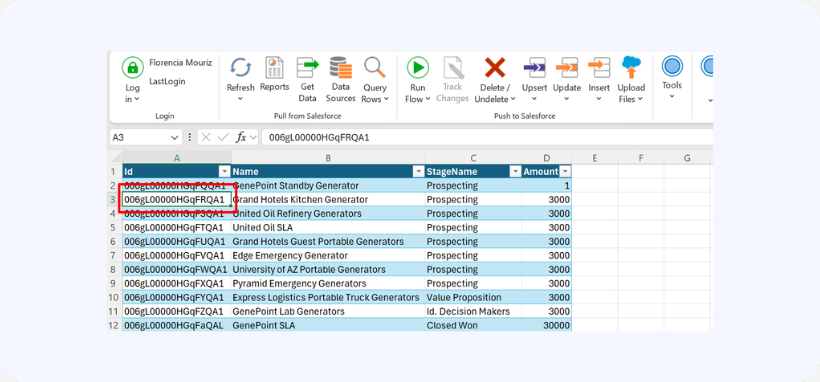
You’ll need a worksheet that includes a column of Salesforce record IDs. This typically happens automatically when you load data into Excel using XL-Connector (for example, a list of Opportunities pulled from a query).
Open a single record
-
1
Click the cell containing the record ID you want to open.

-
2
On the XL-Connector ribbon at the top of Excel, click Open in Salesforce.
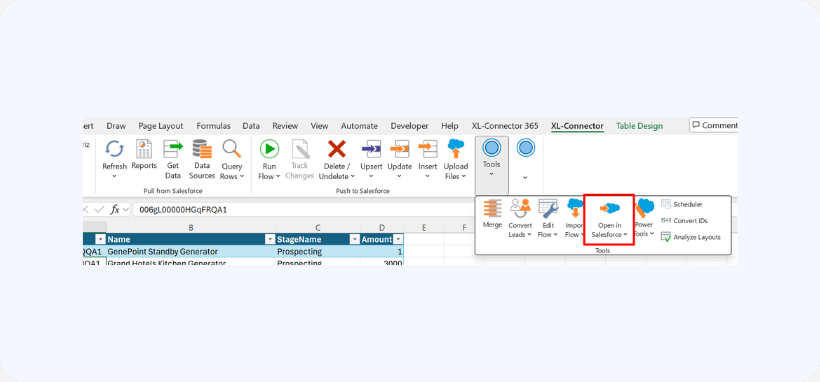
The record opens in a new browser tab in Salesforce, where you can view the full record—including all its fields, related lists, and other details.
Open multiple records at once
When you need to review or update several records together, XL-Connector can open them all in one step.
-
1
Select the rows containing the record IDs you want to open. You can:
-
- Drag to select a continuous block of rows, or
- Hold Ctrl and click to pick individual rows scattered throughout your list.
-
-
2
On the XL-Connector ribbon, click Open in Salesforce.
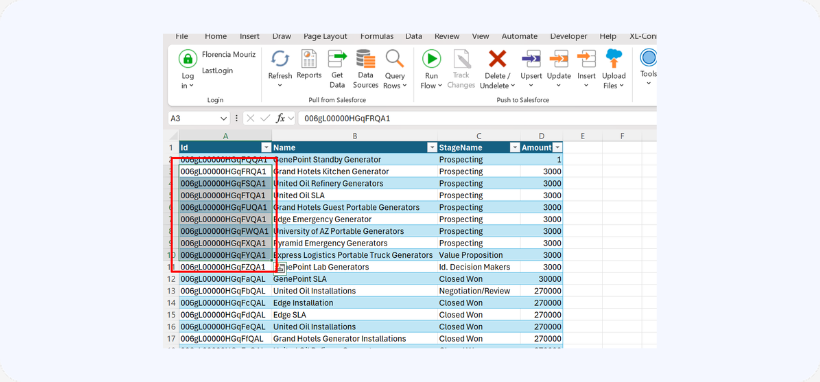
Each selected record opens in its own browser tab. From there you can quickly switch between tabs to compare information or make updates—without manually searching for each record one at a time.
Why it's useful
Opening records directly from Excel saves significant time when you’re working with many records at once. Instead of copying IDs or searching for records individually in Salesforce, you go straight from your worksheet to the live record in just a couple of clicks.

