
 Get Started Free

With the introduction of G-Connector Lite we are addressing the most common security concern all our customers have – how to provide the efficiency of working with Salesforce.com data from a Google Sheet to all users in an organization at the same time ensuring the integrity of data.
By turning on G-Connector Lite for your users the company administrator remains in full control of what the users can or cannot pull from Salesforce or push back to it:
- The administrator sets up the connection between a Google sheet and report or SOQL query in Salesforce thus defining what data the users of G-Connector Lite will be able to pull from Salesforce.
- The administrator defines all mappings for a Google sheet using G-Connector templates, ensuring that only certain data fields will be available for upload to Salesforce.
G-Connector Lite menu is as simple is it may get:
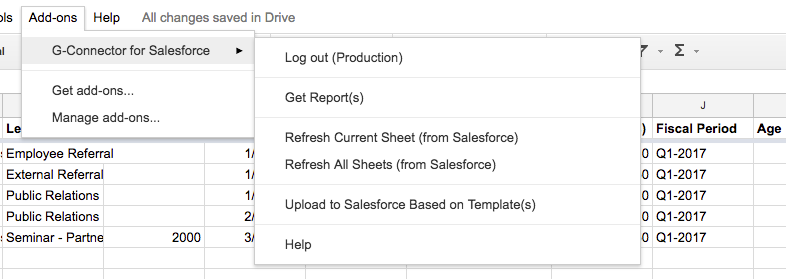
With correctly setup templates, interacting with Salesforce from Google Sheets becomes a breeze for all users:
-
1
A user opens the spreadsheet they intend to work with.
-
2
A single click on Refresh Current (or All) will pull the relevant data from Salesforce.
-
3
A single click on Upload to Salesforce Based on Template(s) will push the data in the sheet to Salesforce based on the settings pre-defined for that sheet by the administrator in the associated template(s).


