
 Get Started Free



After doing an automatic data refresh, you may want to check your data for consistency and be notified if something is off, or on the contrary – the way you expect it to be. For this purpose, G-Connector for Zoho CRM has an automatic Alerts functionality.
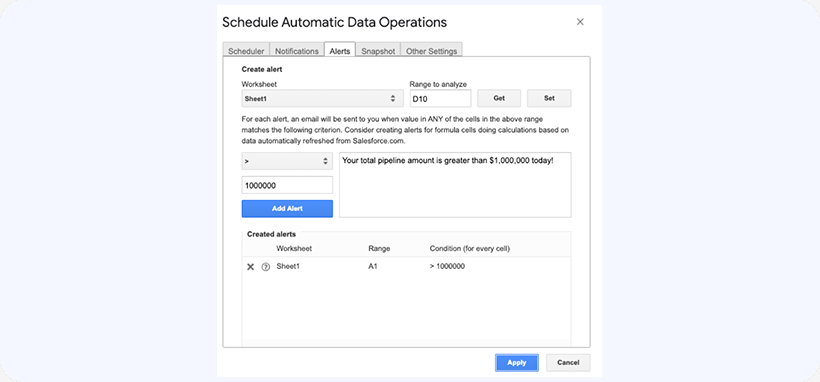
To add automatic alerts to your workbook, click on Schedule Automatic Data Operations from the G-Connector for Zoho CRM menu. Then go to the Alerts tab. In this tab you’ll be able to analyze multiple ranges and send an alert email if the range contents match the defined value:
Then click on the Scheduler tab and add a Alerts action to the list of actions. This will ensure the alerts are processed at the time you specify:
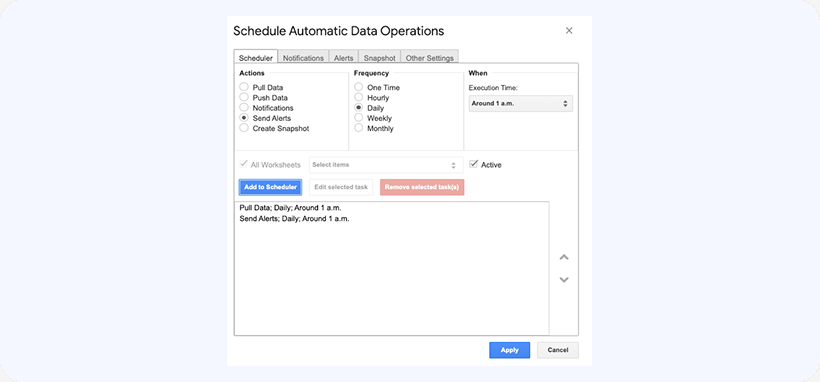
Click Apply to schedule the actions.

