Get Started Free
 What Salesforce is changing in July 2026
Starting July 1, 2026, Salesforce is enforcing step-up authentication on all report actions. This means every time a report is accessed, Salesforce will require an additional identity verification step (MFA). The rollout is staggered across production orgs over approximately 30 days, so the exact date it activates for your org isn’t known in advance.
For more details, see Salesforce’s official announcement
Because Xappex products pull reports programmatically in the background, there’s no way to present a second-factor prompt mid-process. This is a platform-level constraint that affects all Salesforce integration tools — not just ours.
What Xappex is doing about it (effective June 18, 2026)
Starting June 18, 2026, Xappex products automatically detect whether step-up authentication for reports is enabled in your org. If your org has it on and the standard CSV export is blocked, Xappex will transparently fall back to Salesforce’s Analytics API — no action required on your part.
This means your reports will continue to run even after Salesforce enforces the change. However, switching the data extraction methods does come with some limitations.
Limitations of the Analytics API fallback
-
Unique Ids column for reports over 2000 rows.
If your report is larger than 2000 rows and is failing when being pulled through Xappex, the most reliable solution would be to make sure the report contains a column with unique identifiers. Adding the standard Salesforce Id column of the root report object will make sure the report is pulled correctly. -
Org-wide row limit. Salesforce caps Analytics API usage at over 3,000,000 rows per hour across your entire org. This limit is shared — if multiple users in the same org are pulling report data simultaneously, they’re all drawing from the same pool. Heavy concurrent usage can exhaust it quickly.
What you can do to work around the limitations
-
1
Work with Salesforce Support
Some of our customers were able to request postponement of the ‘Step-up authentication for reports’ feature enforcement.
-
2
Continue using reports
We’ll silently route them through Analytcs API so you shouldn’t notice the difference. Be mindful of the volume of data retrieved by your whole org per hour (the limit is over 3,000,000 records.)
-
3
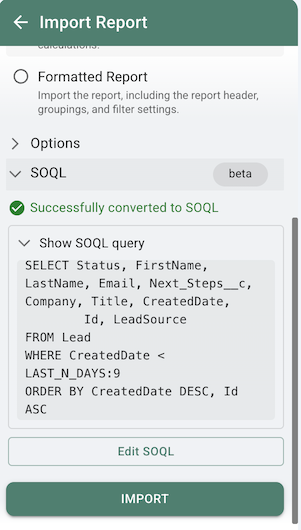
Convert your report to SOQL (now available)
Xappex now includes a Report to SOQL converter directly in the Reports import dialog. Open a report, expand the SOQL (beta) section, and the tool will generate the equivalent SOQL query for you. You can then edit and import using that query instead — SOQL queries bypass the report layer entirely and are not subject to the Analytics API rate limit.

-
4
Pull data via SOQL query
This has always been available under Pull Data → From Objects and Fields. It bypasses the report layer entirely and is the cleanest long-term solution. It also enables in-cell filters for building dynamic, self-refreshing reports.
-
5
Use natural language to generate queries (coming soon)
We’re building an AI-powered query builder — just describe what you need (e.g., “all closed opportunities from last quarter”) and it generates the right SOQL for you.
We know changes like this are disruptive, and we’re doing everything we can to minimize the impact. If you have any questions please reach out to our team at support@xappex.com. Our team is here to support you during this transition.
Check out what's new at Xappex
Stay up to date with the latest product features and releases
 Visit news section



Alexander Tarasevich