
 Get Started Free
Getting Salesforce data into Google Sheets or Excel just got easier. With AI-powered SOQL generation, users can now turn plain-language requests into Salesforce queries without writing SOQL from scratch or switching between tools.
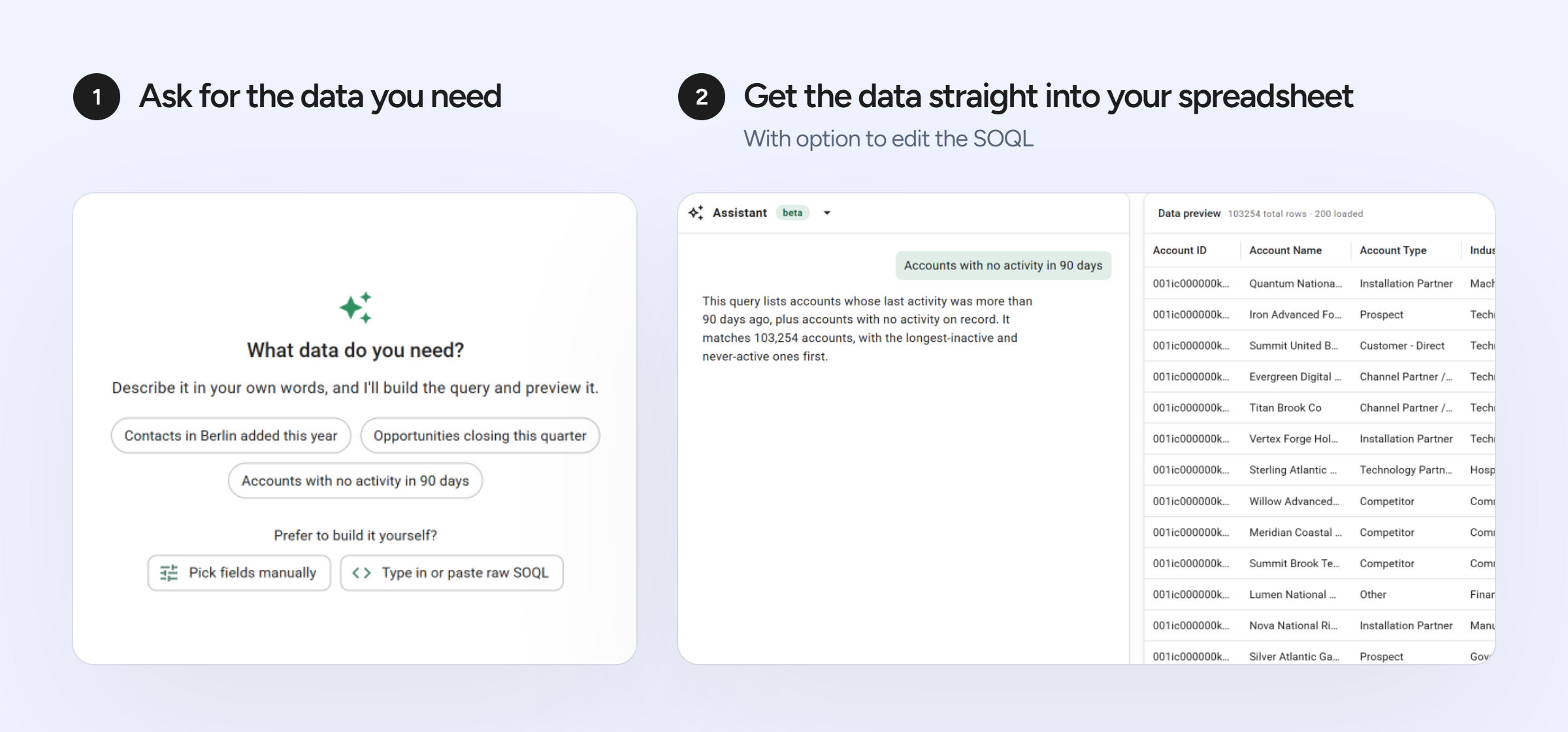
Salesforce SOQL queries are powerful. But writing those queries isn’t always straightforward. You need to know the correct syntax, understand your Salesforce data model, and identify the objects and fields involved. Even experienced Salesforce admins can spend time building and troubleshooting queries.
Xappex is making that process easier with the introduction of AI-powered SOQL generation in G-Connector and XL-Connector 365 for Salesforce.
See AI-powered SOQL in action!
Discover how easy it is to get Salesforce data into Excel or Google Sheets using plain English.
From plain English to SOQL in seconds
Instead of manually writing a query, users can simply describe the data they want to retrieve. For example:
- “Show me all opportunities closing this quarter with an amount greater than $50,000.”
- “Find accounts that haven’t had any activity in the last 90 days.”
- “Get all open cases assigned to my support team, sorted by priority.”
AI uses the request and relevant Salesforce metadata to suggest a SOQL query.
Users can review and adjust the query before running it and retrieving the results into Google Sheets or Excel.
More than another AI SOQL generator for Salesforce
There are already tools that can translate natural-language requests into SOQL.
But generating a query is only part of the job.
With standalone AI tools, users may need to provide Salesforce object and field information, copy the generated query into another application, test it, troubleshoot errors, and finally export the results.
Xappex brings query generation and Salesforce data retrieval into the same workflow.
-
Built around your Salesforce org
Every Salesforce organization has its own data model, including custom objects, fields, and picklist values. Xappex can provide relevant Salesforce metadata to the AI generator, helping it create queries that reflect the structure of the connected org. This reduces the need to manually explain your Salesforce schema or look up field API names.
-
Generate queries where you work with your data
Instead of generating SOQL in a separate chatbot or application, users can create queries directly within Xappex tools. Once the query is ready, they can use the connector to retrieve Salesforce data into their favorite spreadsheet. No unnecessary copying and pasting between applications.
-
Keep the rest of your Salesforce workflow connected
Generating the query is just the beginning. Xappex tools also provide capabilities for Salesforce reporting, data updates, scheduled refreshes, and automated workflows in Google Sheets and Excel. Users can move from retrieving data to working with it without leaving their familiar spreadsheet environment.
-
Making SOQL more accessible
Not everyone who needs Salesforce data is comfortable writing SOQL. AI-powered query generation can help Salesforce admins, analysts, operations teams, and other authorized users build queries without needing to master the syntax first. Experienced users can also save time by generating an initial query and refining it as needed.
-
Designed with data privacy in mind
AI-powered SOQL generation uses Anthropic as an AI sub-processor. When a user actively uses the feature, relevant instructions, query information, and Salesforce metadata may be shared with Anthropic to generate the suggested SOQL.
Salesforce record data is not sent to Anthropic.
Ready to give it a try?
Stop spending time figuring out how to write a query and start working with the Salesforce data you need.
This feature is available for new trials and paid subscriptions. License administrators who prefer not to use it can request that it be disabled by contacting sales@xappex.com.
If your trial has expired and are interested in trying out this new feature, please contact support@xappex.com for a trial extension.
If you are new to Xappex, get started here.
Get started now with AI-powered SOQL generation
Stop spending time figuring out how to write a query and start working with the Salesforce data you need.



Alexander Tarasevich