Get Started Free



Both are data loading tools that enable unlimited data import, export and overall data management. Discover their main features and differences to decide which is the best option according to your team’s needs.
What is XL-Connector?
XL-Connector is a popular tool that integrates Excel with Salesforce, making it easy to manage data between the two platforms. With its fast and secure API connection, users can quickly export, import, refresh, and transform data from Excel.
This plugin benefits all Salesforce users, providing a simple way to have a live view of the data, and efficiently manage it in a familiar Excel environment. Additionally, XL-Connector provides numerous admin tools for working with Salesforce files, images, fields, metadata, etc.
What is DataLoader.io?
Dataloader.io, developed by MuleSoft and now part of Salesforce, is a cloud-based tool for managing Salesforce data. It simplifies tasks like importing, exporting, and deleting data, offering a more intuitive experience than the traditional Salesforce Data Loader.
While it includes all the core functions of Data Loader, Dataloader.io goes further with advanced features such as task scheduling, detailed logging, and cloud storage integration.
Feature Faceoff: Dataloader.io vs. XL-Connector
Data Manipulation and Customization
Dataloader.io: It provides basic import/export functions but lacks in-platform data transformation tools, requiring users to clean or modify data before uploading
XL-Connector: It uses Excel formulas, pivot tables, and filters, enabling users to perform custom calculations and clean data before uploading it to Salesforce. It is ideal for advanced data manipulation needs.
Data Import in Salesforce
Dataloader.io: Dataloader.io lets us easily insert/update/upsert many data types into Salesforce standard and custom objects. We can upload data in CSV format, and it also has intuitive data mapping, which helps us match fields from CSV files to the appropriate Salesforce fields, minimizing errors.
It supports batch processing, efficiently importing large volumes of data at once.
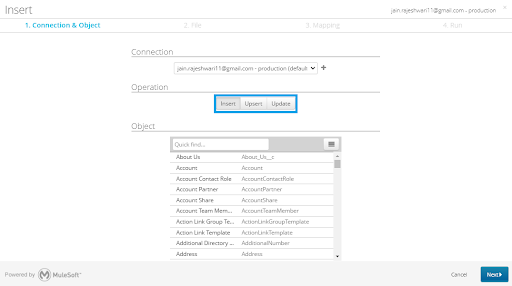
XL-Connector: XL-Connector simplifies pushing data to Salesforce from Excel with operations like Insert, Update, Upsert, and Delete. It allows easy management of records by mapping Excel columns directly to Salesforce fields, eliminating the need for CSV files.
XL-Connector provides clear error reporting and detailed logs, giving users full visibility into any issues during data operations, ensuring smooth management.

Data Export from Salesforce
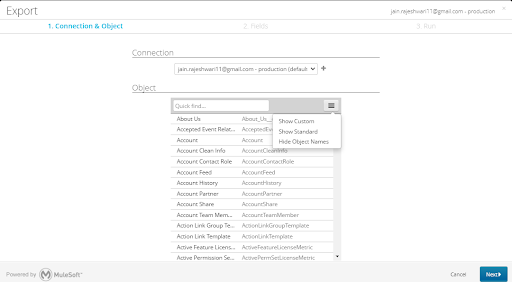
Dataloader.io: We can extract data from various Salesforce objects for reporting, analysis, or backup purposes. With Dataloader.io, we can create custom queries to specify which data to export, which can be retrieved in CSV and Excel formats.
It enables scheduling regular data exports for ongoing updates.
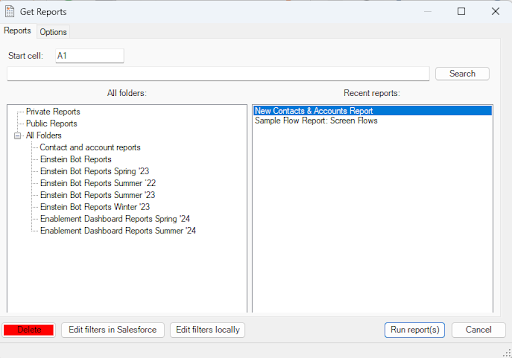
XL-Connector: In XL-Connector, you can import Salesforce data using a pre-existing report or SOQL.
For reports, click “Get Reports,” select or search for the desired report, and click “Run Report.” Data appears as a flat table unless you check “Printable View” to retain its original format.
Key benefits include the ability to:
-
Run multiple reports simultaneously, each in a separate Excel tab.
-
Delete reports directly from the XL-Connector dialog.
-
Quickly refresh data in Excel by clicking “Refresh” or “Refresh All.
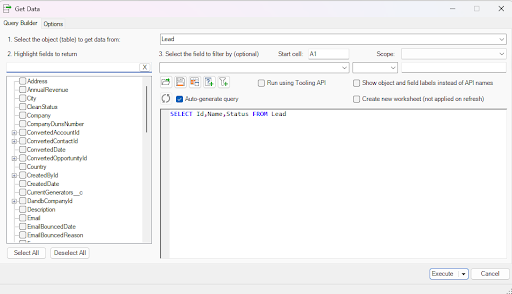
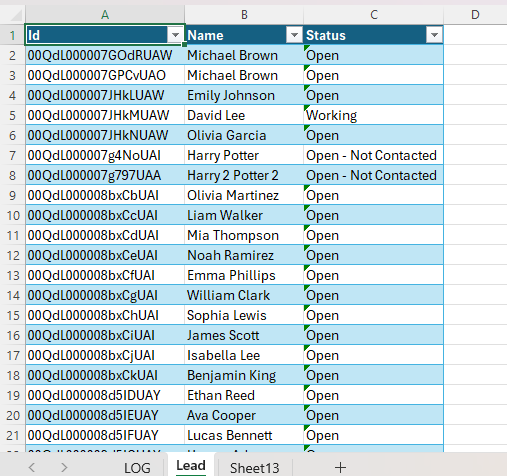
XL-Connector also makes it easy to pull Salesforce data into Excel using SOQL, whether experienced or new. Just click “Get Data” in the ribbon. Experts can enter queries directly, while beginners can use the query builder to select objects and fields without coding. Data can be placed anywhere in the sheet, even across different columns.
You can save or export queries, and the “Grab from spreadsheet” feature quickly adds Excel values to your SOQL query.
XL-Connector also supports drop-downs for picklist fields and dynamic SOQL to pull live data based on cell values.
Pricing
XL-Connector excels with its annual pricing model, offering a cost-effective solution for long-term users compared to Dataloader.io’s monthly fees. Even the free version of XL-Connector allows unlimited data to be pulled from Salesforce, making it ideal for managing large data volumes.
Dataloader.io operates on a monthly subscription model, with plans ranging from Free to $99/month (Professional) and $299/month (Enterprise). In contrast, XL-Connector follows a yearly licensing model, with paid plans starting at $99/year (Team Player) and $299/year (Enterprise Admin).
Additional Features Offered by XL-Connector
Manage Custom Metadata in Salesforce
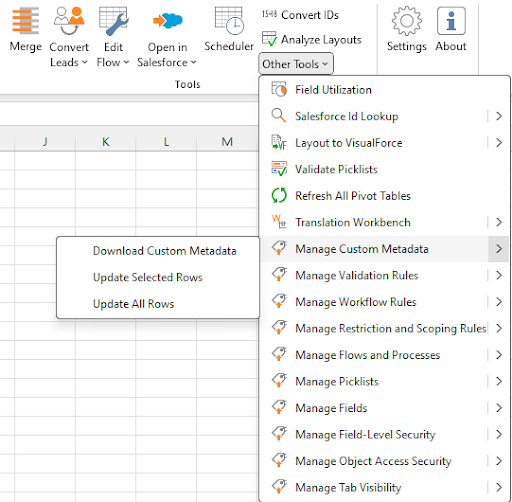
Custom metadata in Salesforce allows you to create and manage configuration data that applications can access. Unlike custom objects, it stores settings and configurations, making applying consistent behavior across environments easy.
Using a familiar Excel interface, XL-Connector efficiently manages custom metadata in Salesforce. It lets users quickly perform bulk tasks like creating, updating, or deleting records, saving much time.
Even if you’re not a developer, XL-Connector helps you manage metadata efficiently while keeping data secure and compliant with Salesforce standards.
Please refer: https://www.xappex.com/blog/salesforce-custom-metadata/
Field Utilization across page layouts
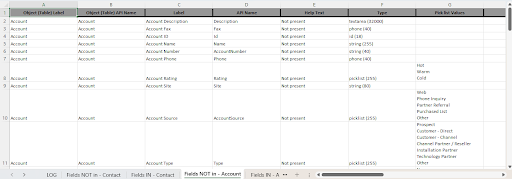
Over time, many organizations accumulate no longer used or relevant fields. These fields are often removed from layouts but left behind in the system. Optimizing field usage across Salesforce page layouts improves efficiency and prevents slowdown from outdated, unused fields.
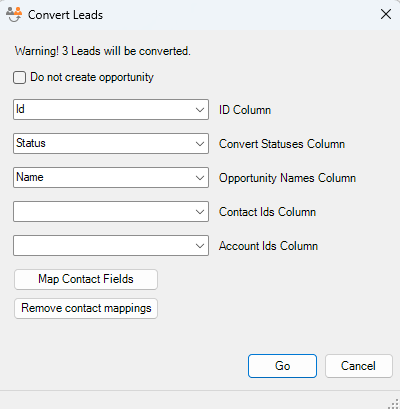
Mass Convert Leads
XL-Connector enhances efficiency by enabling bulk lead conversions in Salesforce, saving significant time. It allows for customization and ensures accurate mapping of lead data to accounts, contacts, and opportunities

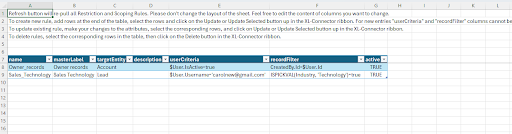
Manage Restriction and Scoping Rules
Managing Restriction and Scoping rules in Excel using XL-Connector provides numerous benefits. The familiar Excel interface makes it easy to manipulate rules quickly, saving you time and effort when setting up them individually.
Merge duplicate Records
This tool enables you to easily merge multiple records from Excel with just a few clicks, simplifying the process and ensuring clean data.
Here’s what happens during a merge operation:
- Delete Duplicate Records: The tool identifies and deletes the duplicates.
- Move Child Records: Any child records from the deleted duplicates are automatically moved to the master record.
- Update Fields: If fields are mapped, data from the duplicates will replace the corresponding fields in the master record using the last entry’s value.
Please refer: https://www.xappex.com/blog/salesforce-duplicate-management/
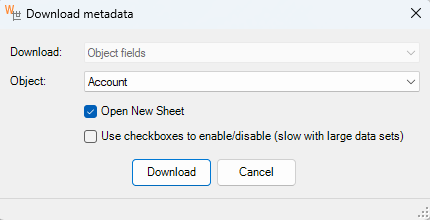
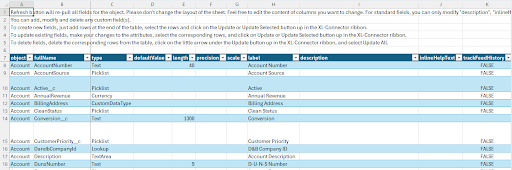
Manage fields
Managing fields in Salesforce can be tricky, but XL-Connector makes it easy. You can download all your fields, make changes, and upload them back to Salesforce in one go. It’s a huge time-saver and way easier than handling everything through Salesforce’s interface.
Run Any Data Operation with One Click
XL-Connector’s Enterprise Admin and Team Player editions make it easier for Salesforce users to manage data efficiently. The Run Flow button allows users to perform several actions in just one click, saving them time and effort.
Here’s what you can do:
- Run SOQL Queries: Quickly pull data from Salesforce to get the information you need.
- Create, Update, and Upsert Records: Easily manage records directly from Excel, whether adding new ones or updating existing data.
- Delete Records: Remove outdated or incorrect records effortlessly.
- Run VBA Macros: Automate your Excel tasks and streamline your workflow.
- Execute Anonymous Apex: Run custom Apex code directly, using values from your Excel file.

Key capabilities of XL-Connector
-
Data Loading: Perform unlimited exports and imports in bulk directly from Excel. Pull your data from Salesforce reports or via dynamic SOQL. No more manual work and csv hassle!
-
Data Cleansing: Keep your data quality with seamless manipulation: mass update, upsert, insert, delete, undelete and merge your records.
-
Reporting and Data Analysis: Create and share custom reports in Excel with all the great tools spreadsheets have to offer. Pull your Salesforce data with precision, then slice and dice your data at will!
-
Metadata Management: Manage your metadata directly from a spreadsheet. Manage fields, validation rules, processes, picklists, security settings, and much more.
-
Data Migration: Effortlessly migrate data between organizations. Profit from a deep understanding of Salesforce data models and relationships.
-
Data Backup and Storage: Import/export and share Salesforce files and data in your team’s local hard drive.
-
Multiple accounts support: If you have several logins, XL-Connector keeps them for you so switching between accounts is easy. There’s no limit as to how many Salesforce.com orgs you can connect to.
-
Automation: Schedule automatic data imports, exports and any other data operation for intervals up to 5 minutes in any Excel sheet saved in OneDrive.
-
Special Admin tools: Enjoy a set of admin tools that will give you full support for merging your records and converting leads in a breeze.
Feature Comparison Summary
| Feature | Dataloader.io | XL-Connector |
|---|---|---|
| Overview | A cloud-based tool developed by MuleSoft, now part of Salesforce, for managing data. | An Excel plugin that integrates with Salesforce for easy data management. |
| Data Manipulation | Basic import/export functions; lack in-platform transformation tools. | Allows advanced manipulation |
| Data Import | Supports CSV uploads, with intuitive data mapping for inserting/updating multiple Salesforce objects. | Allows insert, update, upsert, and delete operations, with Excel-to-Salesforce field mapping and Bulk API support. |
| Data Export | Custom queries for data extraction in CSV/Excel formats | Retrieves data using Salesforce reports or SOQL |
| Lead Conversion | N/A | Enables bulk lead conversions with accurate mapping to Salesforce objects. |
| Restriction & Scoping Rules | N/A | Simplifies management of restriction and scoping rules within Excel. |
| Salesforce Admin Tools | No dedicated Salesforce admin tools | Includes various Salesforce admin tools like Fields Manager, Layout Analyzer, and Picklist Manager.(For enterprise Admin License) |
| Data Volume (Free Plan) | 10,000 records/month | Unlimited data pull from Salesforce (Reports and SOQL); the only limit is Excel's handling capacity, which is limited to 1,048,576 rows. |
| Pricing | Free: $0/month/user, Professional: $99/month/user, Enterprise: $299/month/user | Free: $0/user/month, Team Player: $99/user/year, Enterprise Admin: $299/user/year |
Conclusion
Dataloader.io is perfect for an easy-to-use, cloud-based tool to import, export, and delete Salesforce data, with handy features like batch processing and task scheduling.
XL-Connector, however, is better suited for users who prefer working with Excel and need more advanced data management. It offers greater flexibility for manipulating data, reports, and managing metadata, all from an Excel-based interface.
Give it a try—sign up for a free trial today and see how it can make your data tasks a breeze!

Carolina Moore
Brand, Digital Marketing and Content/SEO Lead
With 20+ years of experience in content, digital marketing, and project management across B2C and B2B industries, including consumer goods and SaaS, she specializes in Salesforce and HubSpot environments, with a strong focus on CRM data management, automation, and user productivity.