Get Started Free


Salesforce is rolling out a change that requires step-up authentication when exporting reports, with an enforcement window of July 1 through August 1, 2026. We at Xappex have been preparing for this, and all of our tools will continue to work with reports after the change goes live. Here’s what you can do once it takes effect in your org.
Use the Get Reports function as before
CSV export will no longer be available, but XL-Connector will pull your reports to Excel through a different route, so your existing setup keeps working. One limitation to be aware of: you can’t pull more than 3,000,000 records per org per hour. If you hit that limit, you have more options — read on.

Reports capping at 2,000 records? here's why
One thing to note if you’re on the free version of XL-Connector: report pulls are capped at 2,000 rows due to the new Analytics API data extraction method. The good news: the Report-to-SOQL converter is available on the free version too, so you can still convert your report and pull the data with no limits. If you prefer to pull large reports straight to Excel without converting to SOQL, you’ll need a paid license to retrieve the full result set. The higher per-org limits above apply only to licensed users.
Convert your report to SOQL
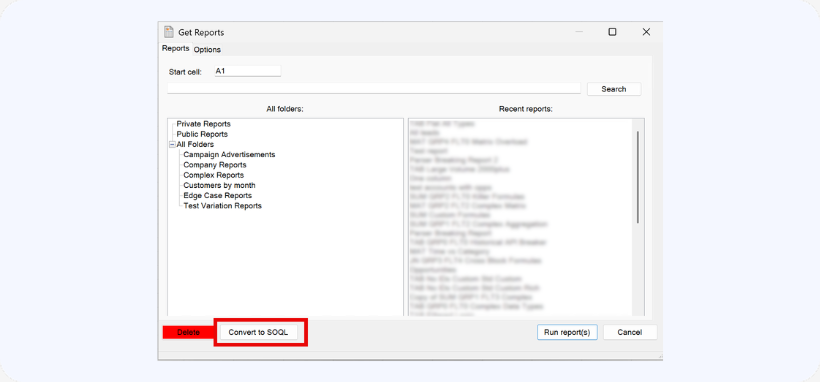
XL-Connector now includes a Report-to-SOQL converter built directly into the Report dialog. Click Reports, select your report from the list, and click Convert to SOQL.
A new window will open with the Get Data UI and the query already generated. You can then edit that query and import using it instead. Because SOQL queries bypass the report layer entirely, they aren’t subject to the Analytics API rate limit.
Create a SOQL query from scratch
This option has always been available under Get Data, and it’s the cleanest long-term solution because it bypasses the report layer entirely. Using the UI, you can select the fields you want to pull, apply filters, and reference in-cell values to filter data dynamically — all without needing to know SOQL syntax.
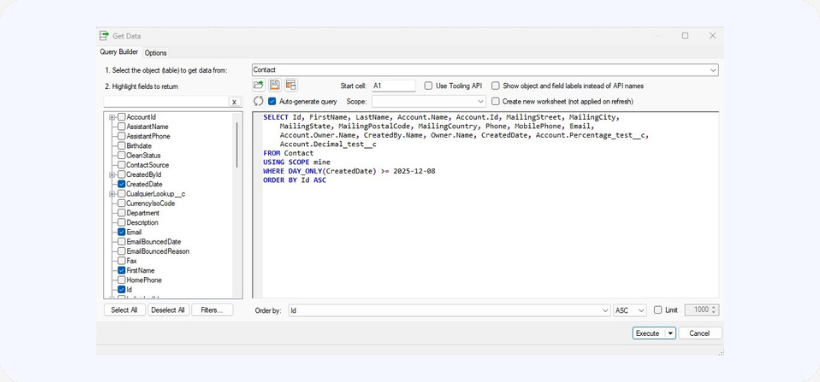
In-cell SOQL formulas are also available to bring a single value directly into any cell.
We know changes like this are disruptive, and we’re doing everything we can to minimize the impact. If you have any questions, reach out to our team at support@xappex.com — we’re here to support you through the transition.
Export reports for free with XL-Connector
Keep report exports running — in Excel and Google Sheets — at no cost.