Get Started Free



If you are utilizing the AccountingSeed application, G-Connector for Salesforce provides a way to pull summary Financial Cube data using cell-level formulas.
The formula syntax is as follows:
=ASFC(“<Ledger>”, “<GL Account>”, “<GL Variable 1>”, “<GL Variable 2>”, “<GL Variable 3>”, “<GL Variable 4>”, “<Accounting Period>”, “<type>”
The parameters to the formula as as follows:
- Ledger – name of the ledger
- GL Account – name of the GL Account
- GL Variable 1,2,3,4 – name of the corresponding GL Variable or “none” for no linked GL Variables, “all” or an empty string “” for any linked GL Variable
- Accounting Period – name of the accounting period
- Type – can be one of the following values: MTD (month-to-date), YTD (year-to-date), OPB (opening balance), BUD (budget)
Here’s a real life example of the formula:
=ASFC(“CLNJ”,”1000-CLNJ Checking”,”all”,”none”,”none”,”none”,”2019-02″,”MTD”)
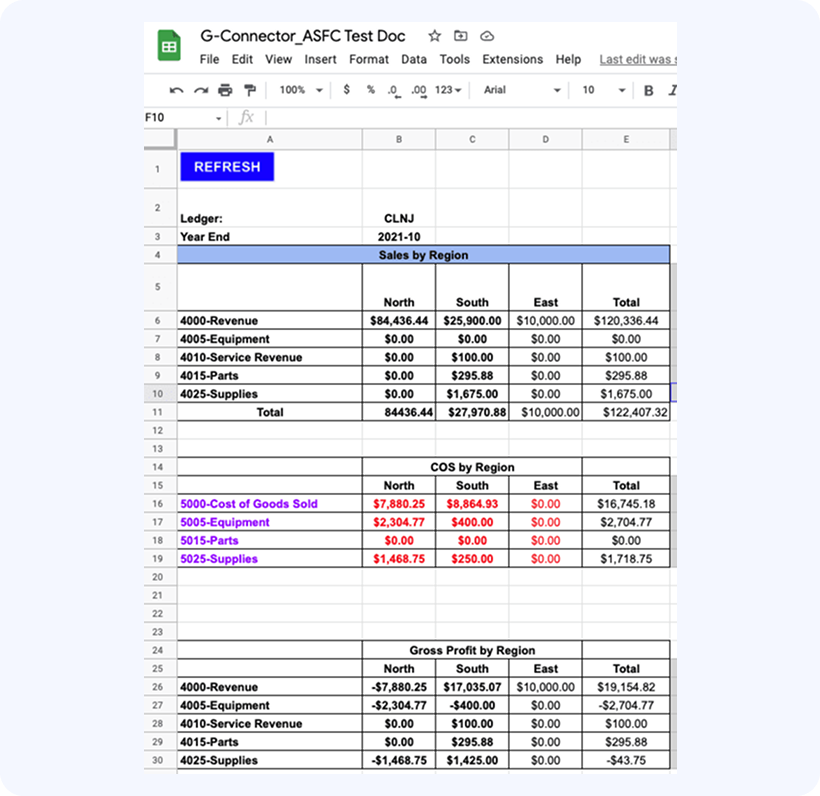
With these formulas you can create comprehensive Financial reports: