
 Get Started Free



When working with Salesforce data, you’ll encounter two formats of record IDs: the older 15-digit, case-sensitive format and the newer 18-digit, case-insensitive format. Salesforce APIs and external integrations often rely on the 18-digit ID, while the 15-digit ID might appear in reports or older workflows. In XL-Connector, you can easily manage and convert these IDs to ensure consistency across your data operations.
Why the Difference Matters
The 15-digit ID is case-sensitive and was designed for internal Salesforce use. However, many external systems (such as Excel lookups, databases, or integrations) are case-insensitive. To address this, Salesforce introduced the 18-digit ID, which appends a checksum to ensure uniqueness regardless of case. When updating or querying data, using the 18-digit format is often necessary to avoid mismatches.
Converting IDs in XL-Connector
XL-Connector simplifies ID conversion:
-
1
Identify any 15-digit IDs you need to convert.
-
2
Use the built-in ID conversion function. In XL-Connector, you can select a column containing 15-digit IDs and choose the option to convert them to 18-digit format.

-
3
XL-Connector will automatically append the correct three-character suffix that transforms each 15-digit ID into its corresponding 18-digit ID.
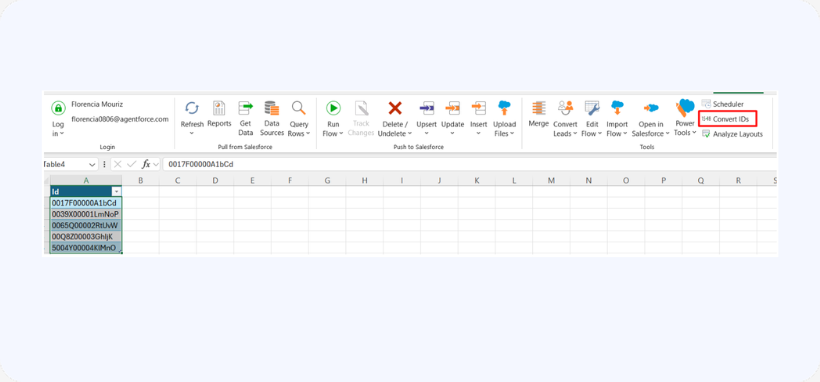
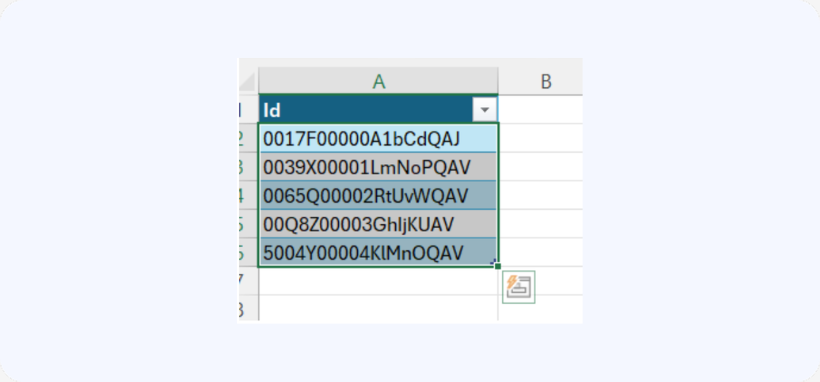
By using XL-Connector’s conversion feature, you ensure that your data handling is accurate and compatible with all systems, helping prevent errors and simplifying data management in Salesforce.

