Get Started Free



XL-Connector lets you upload multiple Attachments and other documents directly from an Excel spreadsheet by specifying a path to the file to be uploaded in the Body column.
Overall, a path to a file can be specified in any column that is mapped to a base64 type field in Salesforce.
Let’s take a simple example of uploading a couple of files as Attachments:
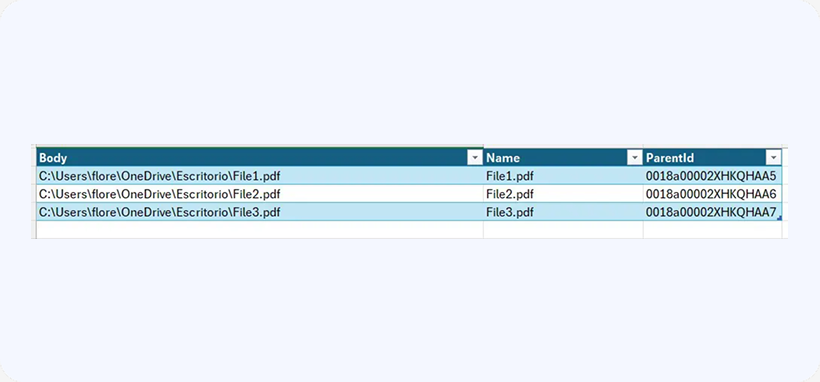
1. Create a spreadsheet specifying the paths to files to be uploaded in the Body column and the name and file extension as follows:
2. Select cells in the two rows and click Insert in the XL-Connector ribbon tab.
3. Select the Attachment object and click OK.
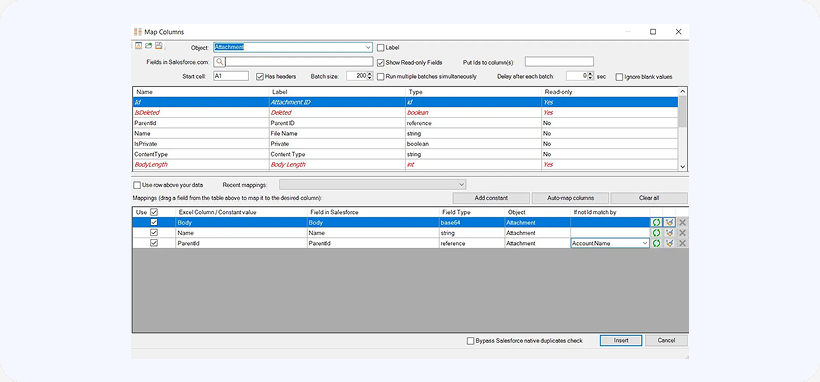
4. In the Mappings dialog box, map the fields as follows: