
 Get Started Free



This feature allows you to manage object-level permissions for Profiles and Permission Sets directly in Excel.
Editable Permissions
You can update:
-
allowRead
-
allowCreate
-
allowEdit
-
allowDelete
-
viewAllRecords
-
modifyAllRecords
-
viewAllFields
How to Manage Object-Access Security
Step 1 – Download Object Permissions
-
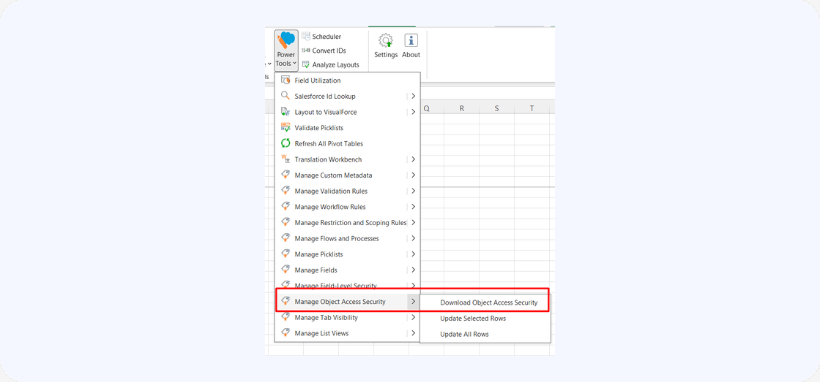
Go to Power Tools → Manage Object Access Security → Download.

-
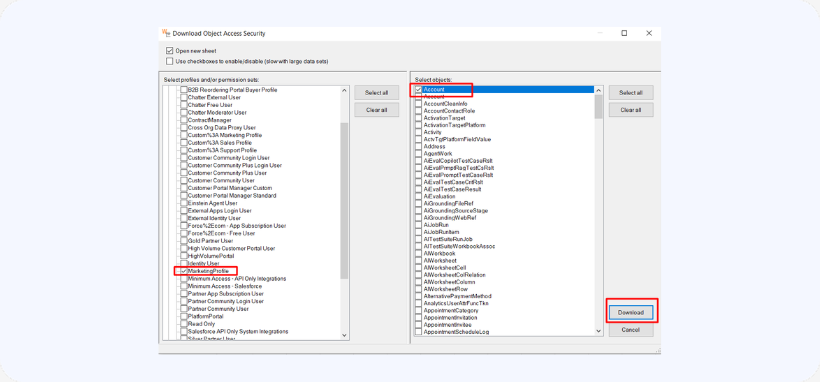
Select the Profiles/Permission Sets and objjects you wat to manage access security for. Then, click download:
Step 2 – Edit Permissions
-
Modify values in the allowed columns.
-
Use any column to filter data.
Step 3 – Apply Updates
-
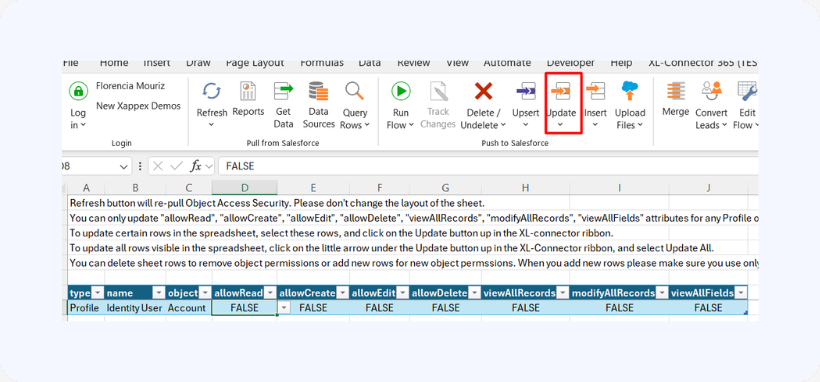
Select rows.
-
Click Update.
Step 4 – Add or Remove Permissions
-
Add rows for new permissions.
-
Delete rows to remove permissions.

Only use objects included in the original download selection.

Notes
- Do not modify sheet structure.
- Ensure correct object names when adding rows.

