
 Get Started Free



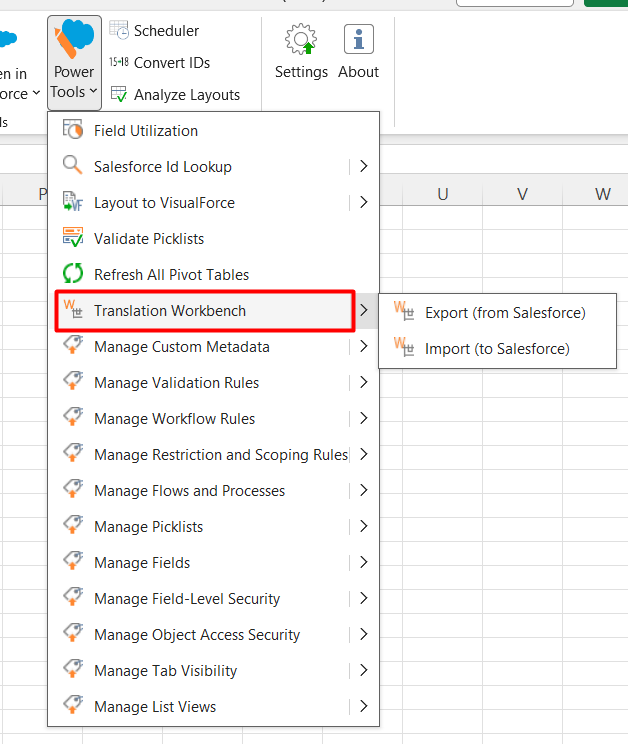
The Translation Workbench in XL-Connector allows you to retrieve, edit, and update Salesforce translation metadata directly from Excel. It simplifies managing multi-language content by enabling bulk updates in a familiar spreadsheet environment.
What You Can Do
-
Retrieve translations from Salesforce (custom labels, object labels, field labels, picklist values, etc.)
-
Edit translations in bulk using Excel features like filtering, sorting, and formulas
-
Upload changes back to Salesforce in a structured and controlled way
-
Manage translations across multiple languages
Why Use a Translation Workbench?
Managing translations directly in Salesforce can be time-consuming, especially in large or multilingual orgs. With XL-Connector, you can:
-
Work faster with bulk edits
-
Reduce manual errors
-
Prepare and review translations before deployment
-
Collaborate easily by sharing Excel files
When to Use It
The Translation Workbench is especially useful for:
-
Multi-language Salesforce implementations
-
Localization projects
-
Large-scale label or picklist updates
-
Release preparation and metadata cleanup
By combining Salesforce metadata access with Excel flexibility, the Translation Workbench makes translation management more efficient and scalable.

