Get Started Free



Salesforce RecordAlertsWrapper: Adding Additional Fields to Output
The RecordAlertsWrapper in Salesforce is a custom Apex wrapper class designed to encapsulate and manage alert-related information for records. It serves as a data structure to group various alert attributes, such as record identifiers, alert messages, and alert types, simplifying their handling and display in automated workflows or custom interfaces.
What Is Salesforce RecordAlertsWrapper Used for?
RecordAlertsWrapper enables developers to pass and manipulate this grouped information efficiently across different components of the Salesforce ecosystem.
Its primary functions are:
- Consolidating Alert Data: Groups alert-related details (e.g., record ID, message, type) into a single structure for easy management.
- Automating Alerts: Facilitates automated workflows and triggers to generate alerts based on record conditions.
- Supporting Frontend Integration: Provides structured data for seamless display in Lightning components, Visualforce pages, or APIs.
- Improving User Experience: Delivers clear, actionable alerts to help users address record-related issues efficiently.
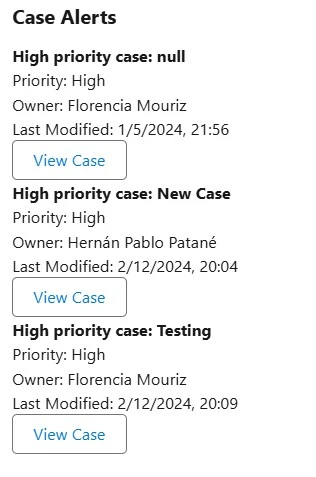
Adding additional fields to the RecordAlertsWrapper output enriches alert data and offers several benefits:
1. Improved Context for Alerts
- Provides users with more detailed information about the record or issue, without having to navigate elsewhere for clarification.
- For example, including fields like RecordOwner, LastModifiedDate, or Status offers immediate insights.
2. Enhanced Decision-Making
- Providing extra fields, such as Priority or DueDate, helps users assess the urgency and take action quickly.
3. Streamlined Workflows
- Automating alerts with enriched data reduces manual lookups and streamlines processes by presenting all relevant details in one place.
4. Greater Customization
- Additional fields allow the alerts to be customized to specific business needs, such as compliance tracking, project deadlines, or team collaboration.
5. Better User Experience
- Comprehensive alert outputs minimize confusion and empower users to respond effectively, improving productivity and satisfaction.
Adding more details to alert outputs helps users work more efficiently, respond faster, and ensure that alerts better support their business goals.
Salesforce: Add Additional Fields to the RecordAlertsWrapper Output
To enhance the RecordAlertsWrapper in Salesforce with additional fields, you can follow these steps:
1. Understand the Existing Wrapper Structure
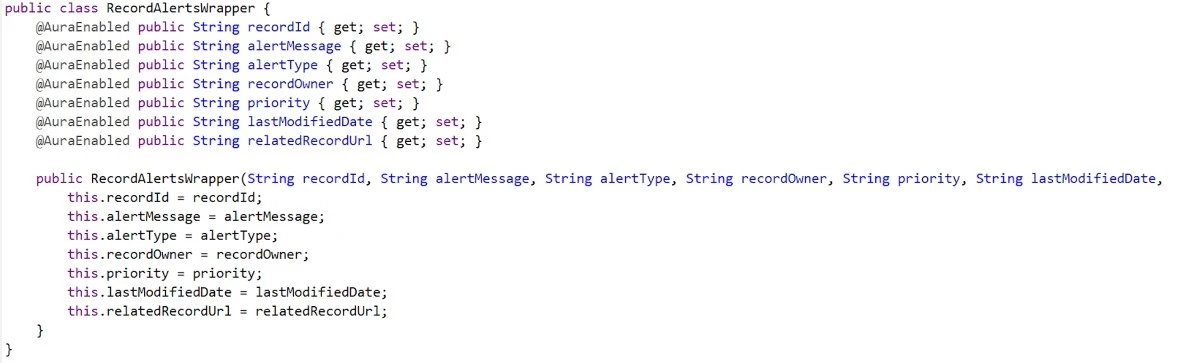
- A RecordAlertsWrapper typically includes fields like recordId, alertMessage, alertType, etc.
- Review the current implementation to understand its purpose and the fields it already includes.
2. Identify the New Fields to Add
- Determine the additional fields you want to include, e.g., recordOwner, lastModifiedDate, priority, etc.
- Ensure these fields align with the wrapper’s purpose.
3. Modify the Apex Class
- Open the Apex class where the RecordAlertsWrapper is defined.
- Add the new fields as properties in the wrapper class.
Conclusion
Customizing the RecordAlertsWrapper with additional fields significantly enhances the value of Salesforce alert systems. It provides users with richer context, streamlines workflows, improves decision-making, and prepares the system for evolving business needs. By offering comprehensive insights directly within alerts, businesses can boost productivity and empower users to address critical issues efficiently.
For even greater efficiency in managing and integrating Salesforce data, tools like Xappex’s XL-Connector 365 offer powerful solutions. These tools simplify data updates, automation, and reporting, making it easier to leverage enriched alert data across your Salesforce environment.
Start a 14-day free trial of XL-Connector 365 and see an immediate boost in your data management!

Florencia Mouriz
Florencia Mouriz is a professional with over two years of experience at Xappex, where she has performed as a Technical Support Agent and Coordinator, and Technical Writer. In this role, Florencia provides support to customers while creating educational content and tutorials that guide users through the implementation of Xappex tools with Salesforce. Her contributions seek to enhance customer understanding and optimize the use of these tools.
Before joining Xappex, Florencia gained valuable experience participating in diverse projects for other companies, where she worked as a Salesforce Administrator and implemented Vlocity solutions. She has an extensive background in Salesforce ecosystems and is determined to deliver impactful results for our company.
Based in Tandil, Bs As, Argentina
To learn more about Florencia’s experience and connect with her, visit her LinkedIn profile