Get Started Free



SOQL provides two ways to count records, and the one you choose affects both the result and how you use it in Apex. COUNT() returns the total number of matching records. In Apex, you can assign the result directly to an Integer. COUNT(fieldName) counts only records where the specified field is not NULL. In Apex, aggregate queries return their results as AggregateResult records. This article explains how each function works, when to use them, and how they behave in Apex and with GROUP BY.
COUNT() vs COUNT(fieldName): What's the Difference?
Although both functions count records, they serve different purposes.
COUNT()
Use COUNT() when you need the total number of records that match your criteria.
- Counts all matching records.
- Returns an Integer when used in Apex.
- Must be the only element in the SELECT clause.
Example:
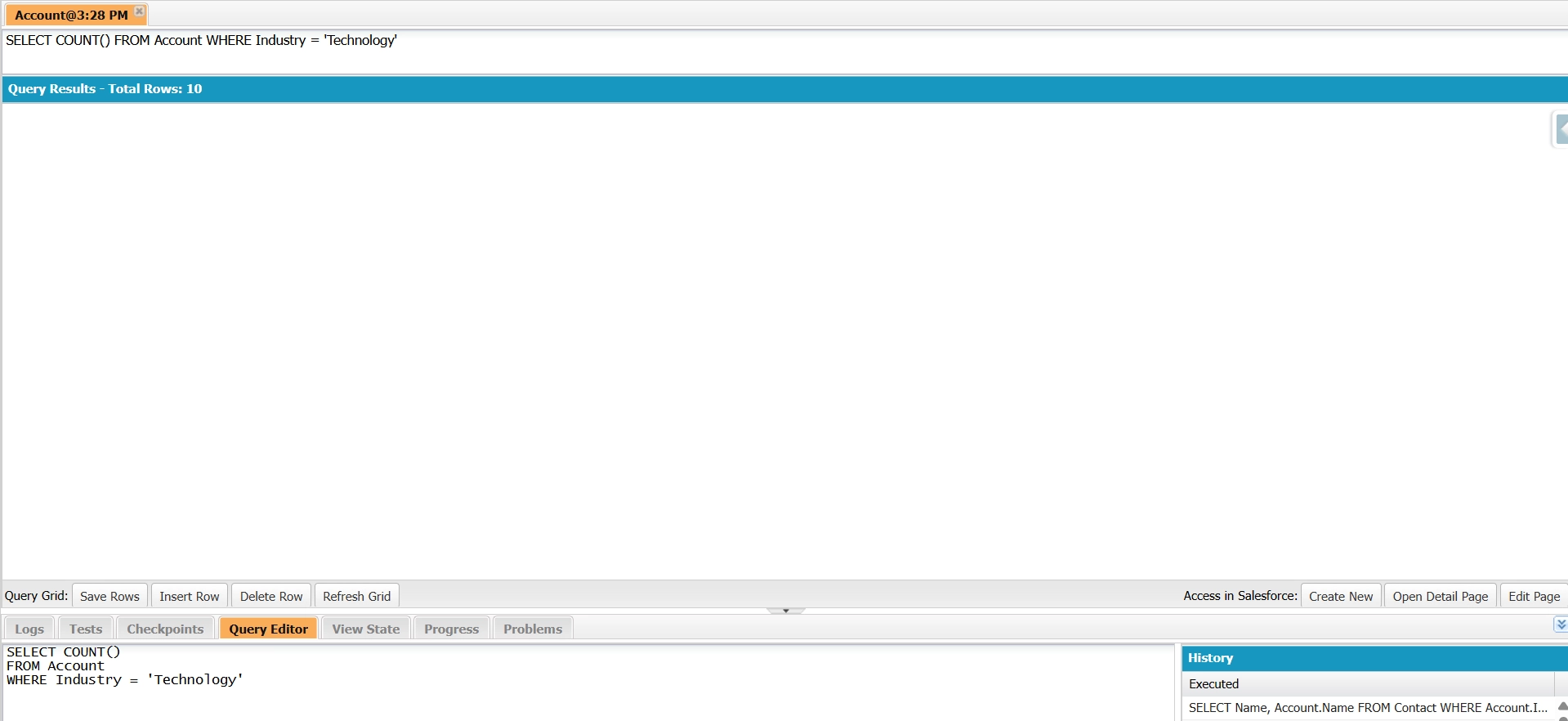
SELECT COUNT()
FROM Account
WHERE Industry = 'Technology'
This query returns the total number of accounts in the Technology industry.
COUNT(fieldName)
Use COUNT(fieldName) when you want to count only records where a specific field contains a value.
- Excludes records where the field is NULL.
- In Apex, aggregate queries return the result as a List<AggregateResult>.
- Supports GROUP BY.
- Can be used with other aggregate functions.
Example:
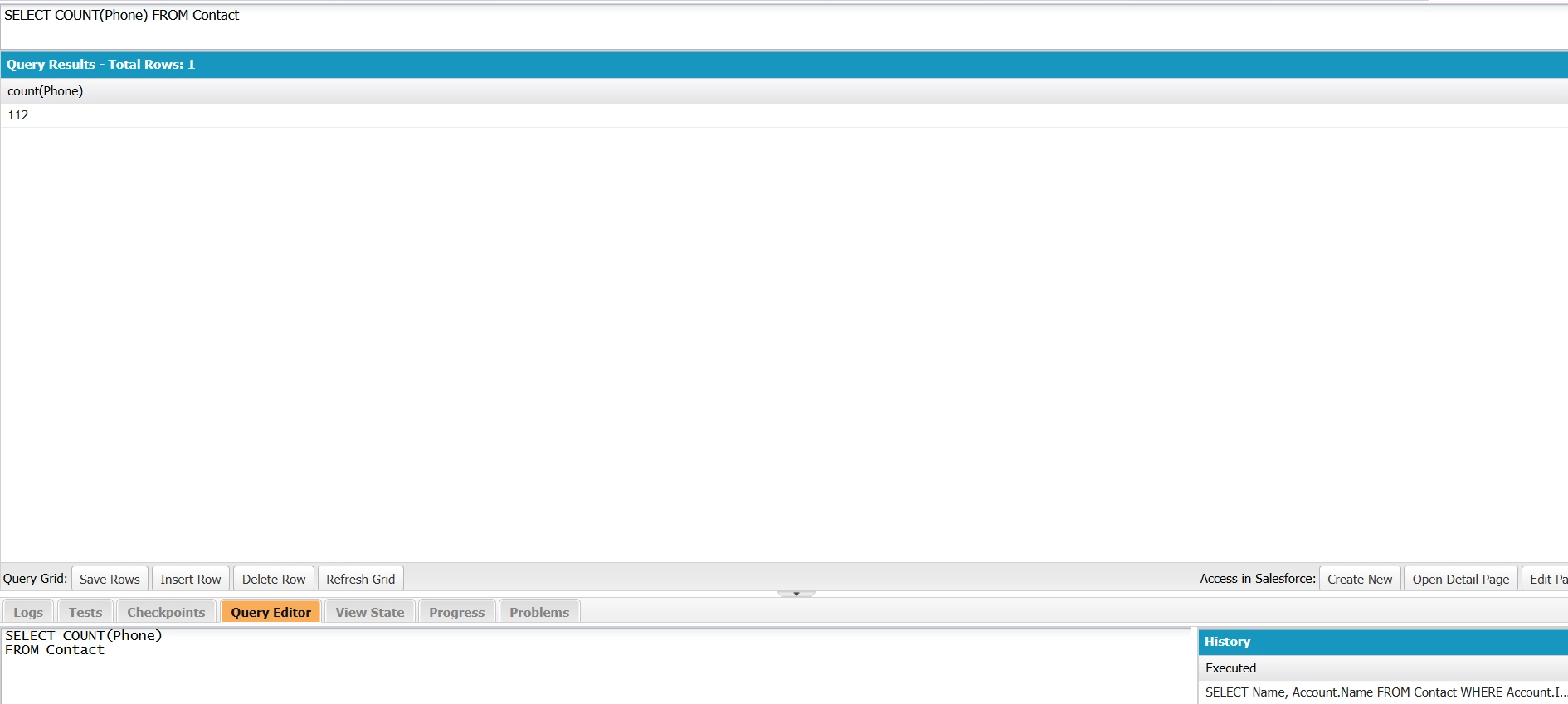
SELECT COUNT(Phone)
FROM Contact
This query returns the number of contacts with a value in the Phone field.
Quick Reference
| Requirement | Function to Use |
|---|---|
| Total number of matching records | COUNT() |
| Count records with a populated field | COUNT(fieldName) |
| Use GROUP BY or other aggregate functions | COUNT(fieldName) |

Tip: Using Multiple COUNT(fieldName) Functions in One Query
You can include multiple COUNT(fieldName) functions in a single query.
For example:
SELECT COUNT(Id), COUNT(Email)
FROM Contact
This query returns:
- The total number of Contact records (COUNT(Id)).
- The number of contacts with a value in the Email field (COUNT(Email)).
This allows you to compare the total record count with the number of records where a specific field is populated.
Using COUNT in Apex
The two forms of COUNT return different types, so match your variable to the query.
COUNT() returns an Integer. Assign it directly to a variable.
Integer totalAccounts = [
    SELECT COUNT()
    FROM Account
    WHERE Industry = 'Technology'
];
System.debug(totalAccounts);
Queries that use aggregate expressions such as COUNT(Id) return AggregateResult records. Read the value by its alias, or by expr0 if you don’t set one.
AggregateResult[] results = [
    SELECT COUNT(Id) total
    FROM Account
    WHERE Industry = 'Technology'
];
Integer totalAccounts = (Integer) results[0].get('total');
System.debug(totalAccounts);
The (Integer) cast is required because get() returns an Object.
The two forms also count differently. COUNT() counts all matching records, while COUNT(fieldName) counts only records where the specified field is not null. For example, COUNT(Id) produces the same result as COUNT() because every record has an Id. However, COUNT(Phone) excludes records where the Phone field is blank.
Use the AggregateResult form when combining COUNT with functions such as SUM() or MAX(), or when grouping records with GROUP BY. Standalone COUNT() does not support these operations.
Note
For dynamic SOQL, use Database.countQuery() when you need a record count from a query string. It executes a COUNT() query and returns the result as an Integer.
Integer totalAccounts =
    Database.countQuery('SELECT COUNT() FROM Account');
Unlike other aggregate queries, Database.countQuery() does not return an AggregateResult. The count is returned directly as an Integer.
Governor Limits
Keep these limits in mind when using COUNT() or COUNT(fieldName) in SOQL:
-
SOQL query limit: Aggregate queries count toward the limit of 100 synchronous or 200 asynchronous SOQL queries per transaction.
-
Returned results: COUNT() returns a single value instead of individual records, no matter how many records match the filter.
-
CPU time limit: When run from Apex, aggregate queries count toward Salesforce’s 10-second synchronous and 60-second asynchronous CPU time limits.
-
Large datasets: Aggregate queries can fail if they are not selective enough or exceed Salesforce execution limits.
-
Performance: Use selective filters and indexed fields when querying large objects to improve performance.
Counting with GROUP BY
Use COUNT(fieldName) when you need counts for each group of records.
COUNT() cannot be used with GROUP BY in API version 19.0 and later. Use COUNT(fieldName)—typically COUNT(Id)—instead.
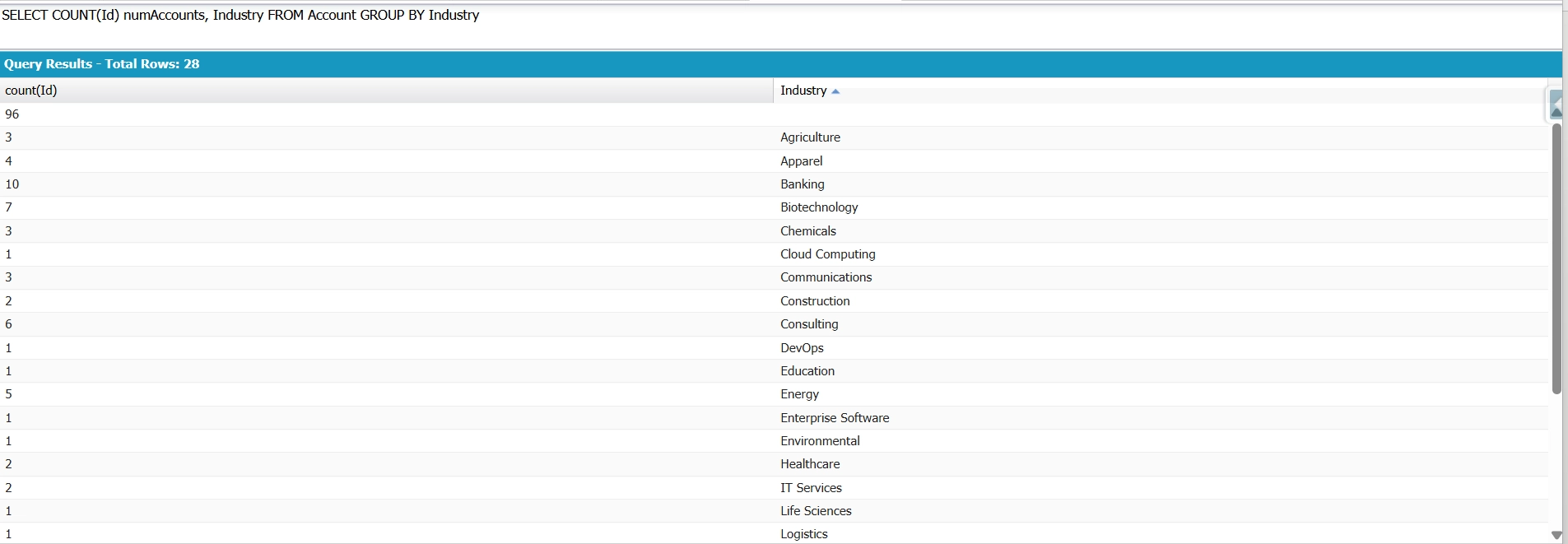
Count Accounts by Industry:
SELECT COUNT(Id) numAccounts, Industry FROM Account GROUP BY IndustryCounts the number of Accounts in each Industry. It groups Accounts by Industry, returning one row per industry with its Account count (including a null row for Accounts with no industry). numAccounts is the alias used to read the count.
Filtering Grouped Results with HAVING
The WHERE and HAVING clauses serve different purposes in aggregate SOQL queries.
Use the WHERE clause to filter individual records before Salesforce groups them. Use the HAVING clause to filter grouped results after Salesforce applies aggregate functions.
When you need to filter groups based on aggregate values, such as the result of a count, you must use HAVING. The WHERE clause cannot reference aggregate functions.
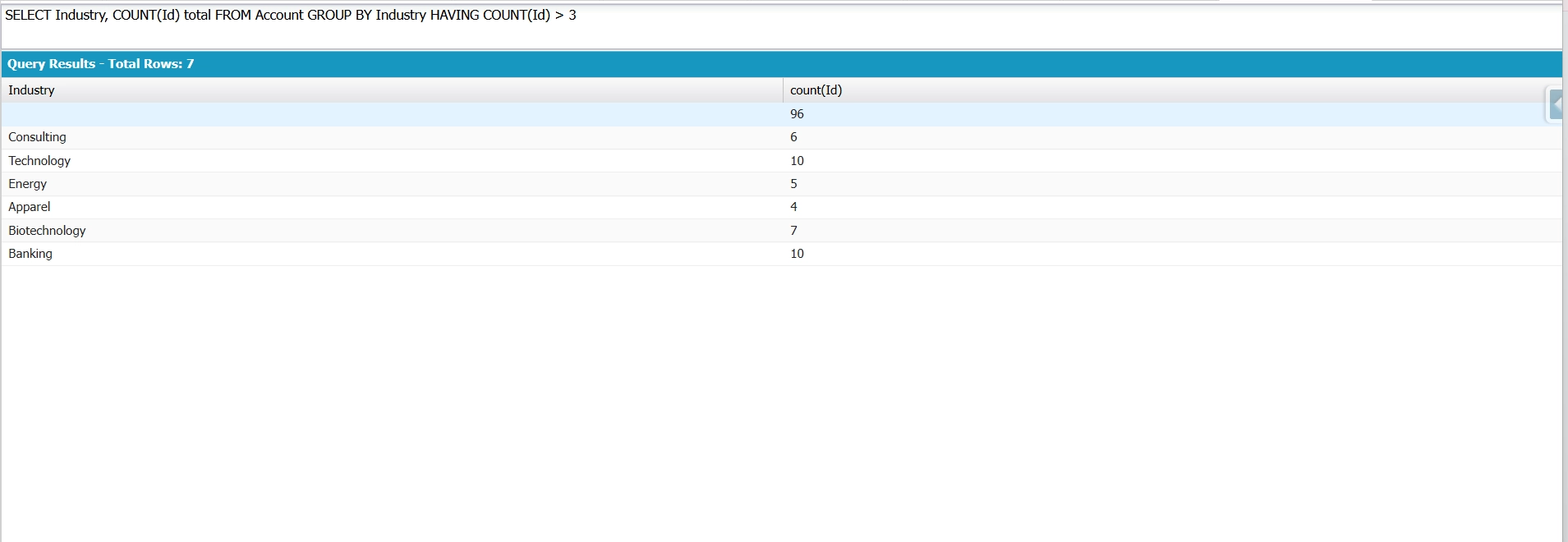
Example: Industries with more than 3 accounts.
SELECT Industry, COUNT(Id) total
FROM Account
GROUP BY Industry
HAVING COUNT(Id) > 3
This query returns only those industries that contain more than 3 accounts. You cannot place COUNT(Id) > 3 in the WHERE clause because Salesforce evaluates WHERE before grouping occurs.
Counting Unique Values with COUNT_DISTINCT()
Use COUNT_DISTINCT() when you need to count unique, non-null values in a field.
Unlike COUNT(), which counts records, COUNT_DISTINCT() counts each distinct field value only once. This function is useful when multiple records share the same value and you want to measure the number of unique occurrences.
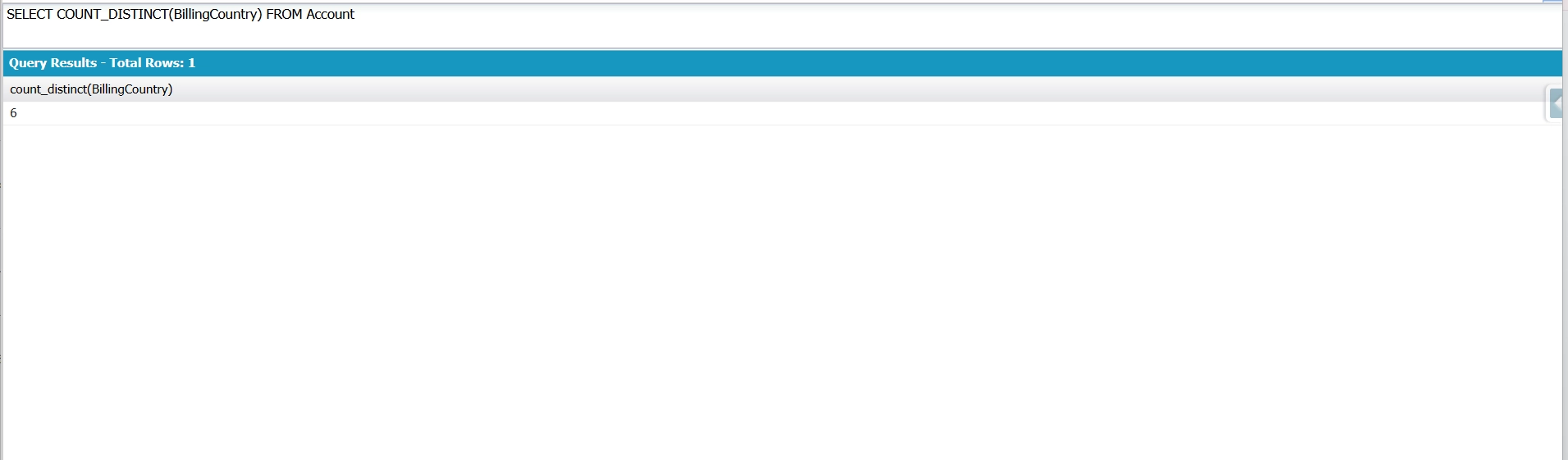
Example: Counts how many different billing countries your Accounts use.
SELECT COUNT_DISTINCT(BillingCountry)
FROM Account
COUNT_DISTINCT skips duplicates and blanks, so 500 Accounts spread across 6 countries returns 6. No GROUP BY needed — you just want the number of unique values, not a row for each.
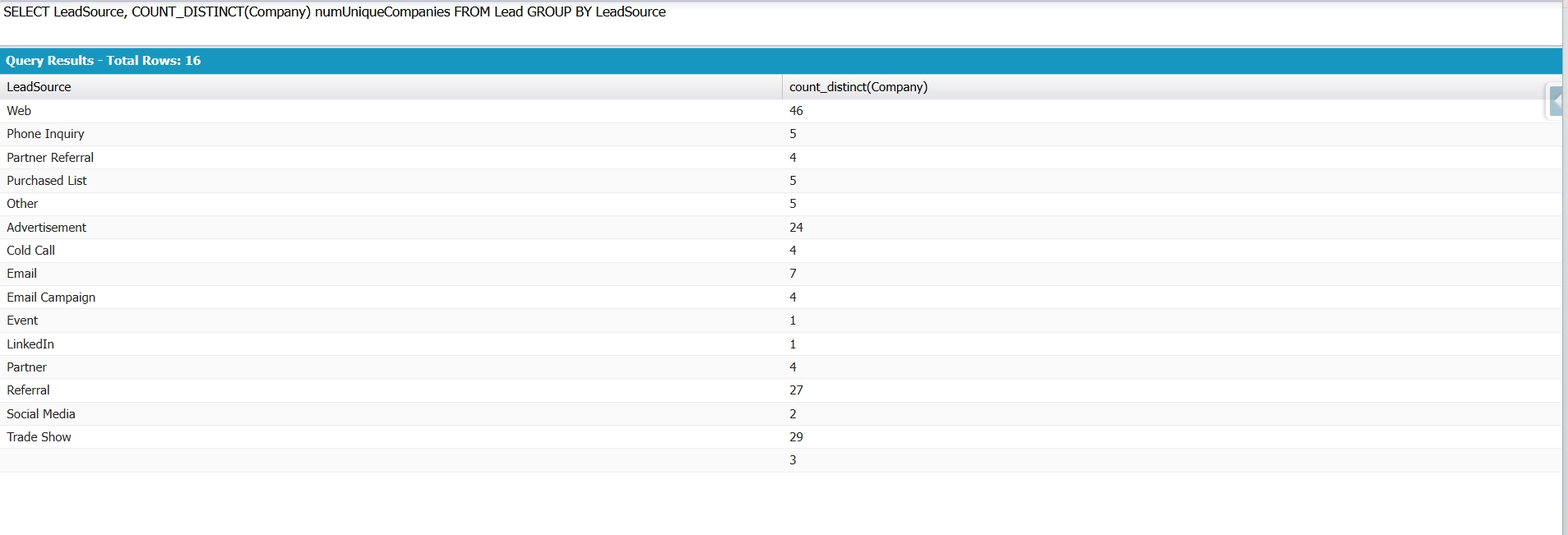
Example: Distinct companies came in through each lead source.
SELECT LeadSource, COUNT_DISTINCT(Company) numUniqueCompanies
FROM Lead
GROUP BY LeadSource
It groups Leads by LeadSource, then counts unique Company values per group. It tells you how many different companies each channel brought in. COUNT_DISTINCT ignores duplicate companies and blanks within each source.
Limitations and Common Errors
COUNT() Must Be the Only Field in SELECT
When you use COUNT() without a field name, it must be the only item in the SELECT clause.
The following query is invalid:
SELECT Name, COUNT()
FROM Account
If you need to combine a count with other aggregate functions, use COUNT(fieldName) instead. For example:
SELECT COUNT(Id), SUM(AnnualRevenue)
FROM Account
This works because every item in the SELECT clause is an aggregate expression.
If you need to return non-aggregated fields alongside aggregate results, include those fields in a GROUP BY clause:
SELECT Name, COUNT(Id)
FROM Account
GROUP BY Name
In SOQL aggregate queries, every selected field must either be an aggregate expression or appear in the GROUP BY clause. Selecting a non-aggregated field without grouping it results in a query error.
COUNT() Doesn't Work with ORDER BY
You cannot combine COUNT() with ORDER BY.
If you need to sort grouped results by record counts, use COUNT(fieldName) together with GROUP BY and ORDER BY.
For example:
SELECT Industry, COUNT(Id) total
FROM Account
GROUP BY Industry
ORDER BY COUNT(Id) DESC
This query returns each industry with its account count, sorted from highest to lowest.
COUNT() Doesn't Work with GROUP BY
In API version 19.0 and later, Salesforce does not allow COUNT() in queries that use GROUP BY.
The following query is invalid:
SELECT COUNT()
FROM Account
GROUP BY Industry
Use COUNT(fieldName) instead:
SELECT Industry, COUNT(Id)
FROM Account
GROUP BY Industry
NULL Handling
Choose the appropriate counting function based on how Salesforce handles null values.
- COUNT() returns the total number of records that match the query criteria. It does not evaluate whether a particular field value is null.
- COUNT(fieldName) counts only records where the specified field contains a non-null value.
- COUNT_DISTINCT(fieldName) counts only unique, non-null values in the specified field.
Use COUNT() when you need a total record count, COUNT(fieldName) when you want to determine how many records have a value populated in a specific field, and COUNT_DISTINCT(fieldName) when you need the number of unique values.
Running COUNT Queries in Excel and Google Sheets
Admins do not always need the Developer Console or Apex to run COUNT queries. Tools such as XL-Connector for Excel and Excel Online, and G-Connector for Google Sheets, allow users to paste SOQL queries directly into a spreadsheet and view the results immediately. Both COUNT() and COUNT(fieldName) queries are supported, making it easy to retrieve record totals without writing code.
A common use case involves preparing quick summaries for non-technical stakeholders, such as account counts by industry, contact counts by region, or opportunity counts by stage. This approach provides spreadsheet-based access to Salesforce data while still using SOQL.
For a broader look at the Salesforce SOQL APIs, see our overview.
Conclusion
SOQL offers different counting functions for various use cases. Use COUNT() to get the total number of matching records. Use COUNT(fieldName) to count records with a value in a specific field or when working with GROUP BY. Use COUNT_DISTINCT() to get the number of unique values. Understanding how each function works helps you write more accurate queries and handle results correctly in Apex.
FAQ
What's the difference between COUNT() and COUNT(Id) in SOQL?
COUNT() returns an Integer containing the total number of matching records and must be the only element in the SELECT clause. COUNT(Id) returns an AggregateResult. Because Id values are never null, both always produce the same total count. The main difference lies in the return type and whether you want to use the count in an aggregate query alongside other selected fields or GROUP BY.
How do I count records by group in SOQL?
Use COUNT(fieldName) together with GROUP BY. For example:
SELECT Industry, COUNT(Id)
FROM Account
GROUP BY Industry
It groups all Accounts by the Industry field, returning one row per industry with its record count — for example "Technology → 100, Banking → 40". Accounts with no industry set fall into a null group.
COUNT() by itself cannot be combined with GROUP BY.
Does COUNT count toward the SOQL row governor limit?
COUNT() returns a single aggregate result instead of individual records, regardless of how many records Salesforce evaluates. Since it does not return matching records, it does not consume query rows based on the number of records counted.
However, aggregate queries using GROUP BY return AggregateResult rows. These rows are subject to Salesforce aggregate query limits, so queries with many groups can still hit governor limits.
How do I count child records related to a parent in SOQL?
SOQL does not support aggregate functions such as COUNT() inside parent-to-child relationship subqueries. Instead, query the child object and group by the parent field:
SELECT AccountId, COUNT(Id)
FROM Contact
GROUP BY AccountId
This query returns the number of contacts associated with each account. If you need the counts alongside parent records, you can map the aggregate results to the corresponding parent records in Apex.
How do I get a count of records matching multiple filters?
Combine WHERE conditions with COUNT(). For example:
SELECT COUNT()
FROM Account
WHERE Industry = 'Banking'
AND AnnualRevenue > 1000000
Counts how many Accounts are in the Banking industry and have annual revenue above 1,000,000. Both conditions must be true for an Account to be included, and COUNT() returns that total as a single number.

Rajeshwari Jain
Content Manager
Rajeshwari Jain is a Technical Support Specialist and Content Writer at Xappex. She applies her practical experience to assist customers and create articles on how Xappex tools work with Salesforce to improve data management and increase efficiency.
She began her IT career in 2022 as a Quality Assurance professional before transitioning into Salesforce administration and technical writing in 2023. With Salesforce Certified Administrator and Associate certifications, Rajeshwari writes blogs on Salesforce flows, admin tools, and updates to expand her skills outside of work.
In her free time, she enjoys reading tech blogs and experimenting with new tools.
Feel free to reach out to Rajeshwari for collaborations or to check out her Salesforce-focused content.