Get Started Free



If you come to Salesforce from a SQL background, one of the first differences you’ll notice is that SOQL does not support SELECT *. Instead, Salesforce introduced the FIELDS() function in Spring ’21 (API version 51.0), allowing you to retrieve fields without listing each one individually.
FIELDS(ALL) returns all fields, FIELDS(STANDARD) returns only standard fields, and FIELDS(CUSTOM) returns custom fields. Understanding when to use each option, along with their limitations, helps you write efficient SOQL queries.
Why SOQL Doesn't Have SELECT *
In traditional SQL, SELECT * FROM table_name is common practice. SOQL was designed differently. By encouraging explicit field selection, Salesforce controls query costs in a multi-tenant environment and keeps query behavior predictable as object schemas evolve. Adding new fields to an object does not change the data returned by existing queries unexpectedly.
Before FIELDS() was introduced, developers had two options: list every field manually or use Apex Schema describe methods to build field lists dynamically. Both approaches required extra maintenance when object definitions changed.
Spring ’21 (API version 51.0) introduced the FIELDS() function as a more flexible alternative.
-- This throws error:
SELECT * FROM Account
Using FIELDS(ALL) to Select Every Field
FIELDS(ALL) is the closest equivalent to SELECT * in SOQL. It returns all standard and custom fields that the running user can access. Because Salesforce treats this as an unbounded field set, the query must include a LIMIT of 200 records or fewer.
SELECT FIELDS(ALL)
FROM Opportunity
LIMIT 200
This query returns up to 200 Opportunity records and includes all accessible standard and custom fields.
You can combine FIELDS(ALL) with filters:
SELECT FIELDS(ALL)
FROM Opportunity
WHERE StageName = 'Closed Won'
LIMIT 200
The WHERE clause filters the records returned, but the 200-record limit still applies.
Because these queries can retrieve a large amount of data, Salesforce enforces the limit to help manage query performance and resource usage.

Tip
You can use FIELDS() in parent-to-child subqueries to return fields from related records without listing them individually.
SELECT
    Name,
    (
        SELECT FIELDS(ALL)
        FROM Opportunities
        LIMIT 200
    )
FROM Account
This query returns Account records and up to 200 related Opportunity records per Account. FIELDS(ALL) includes all accessible standard and custom fields from Opportunity.
FIELDS(ALL) requires a LIMIT of 200 or fewer records, including when used in subqueries.
Where You Can Use FIELDS()
FIELDS(STANDARD) is supported in Apex, Bulk API 2.0, REST API, SOAP API, and Salesforce CLI.
FIELDS(ALL) and FIELDS(CUSTOM) are supported only in REST API, SOAP API, and Salesforce CLI. They are not supported in Apex or Bulk API 2.0.
If you need all fields or all custom fields in Apex, you must explicitly list them in the query.
Using FIELDS(STANDARD) for Standard Fields Only
FIELDS(STANDARD) returns only Salesforce standard fields for an object, such as Id, Name, CreatedDate, LastModifiedDate, and other built-in fields.
Since the set of standard fields is known in advance, FIELDS(STANDARD) is considered a bounded field set. Unlike FIELDS(ALL) and FIELDS(CUSTOM), it does not require a LIMIT clause and is supported in Apex.
SELECT FIELDS(STANDARD)
FROM Account
This query retrieves all standard fields for Account records.
You can also combine it with filtering and sorting:
SELECT FIELDS(STANDARD)
FROM Opportunity
WHERE IsClosed = false
ORDER BY CloseDate ASC
This query returns standard fields for open opportunities and sorts the results by the earliest close date.
Unlike FIELDS(ALL) and FIELDS(CUSTOM), FIELDS(STANDARD) is supported in Apex. This makes it a practical option when you need standard field data without listing each field individually.
Using FIELDS(CUSTOM) for Custom Fields Only
FIELDS(CUSTOM) returns only custom fields on an object. Most custom fields use the __c suffix, while managed package custom fields include a namespace prefix, such as namespace__FieldName__c.
Because the number of custom fields varies between Salesforce orgs and can change over time, Salesforce classifies FIELDS(CUSTOM) as an unbounded field set. As a result, queries that use FIELDS(CUSTOM) must include a LIMIT of 200 records or fewer and are not supported in Apex.
SELECT FIELDS(CUSTOM)
FROM Account
ORDER BY LastModifiedDate DESC
LIMIT 200
This query returns up to 200 Account records and includes all accessible custom fields on the object. The results are sorted by the most recently modified records first.
Note
FIELDS(CUSTOM) must expand to at least one custom field. If you use it on an object with no custom fields and don’t include other fields in the query, Salesforce returns a MALFORMED_QUERY error because the field list is empty.
SELECT FIELDS(CUSTOM)
FROM Asset
LIMIT 200
Including at least one explicit field lets the query run successfully even if the object has no custom fields.
SELECT Id, FIELDS(CUSTOM)
FROM Asset LIMIT 200
Salesforce returns the Id field and any existing custom fields. If the object has no custom fields, only the explicitly selected fields are returned.
Quick Summary
-
SOQL does not support SELECT *.
-
The FIELDS() function, introduced in Spring ’21 (API version 51.0), provides a flexible alternative.
-
FIELDS(ALL) returns all fields but requires LIMIT 200 or fewer and is not supported in Apex.
-
FIELDS(STANDARD) returns only standard fields, does not require a limit, and is supported in Apex.
-
FIELDS(CUSTOM) returns custom fields, requires LIMIT 200 or fewer, and is not supported in Apex.
-
Choosing the appropriate FIELDS() variant helps balance convenience, maintainability, and query efficiency.
Combining FIELDS() with Specific Fields
You can combine FIELDS() with explicitly named fields in the same SELECT statement when the selected fields don’t overlap. A common use case is retrieving all standard fields along with one or more custom fields.
SELECT FIELDS(STANDARD), IsDuplicate__c
FROM Account
This query returns all standard Account fields and the IsDuplicate__c field. As FIELDS(STANDARD) is a bounded field set, a LIMIT clause isn’t required.
Note
If a named field overlaps with the FIELDS() set, the query fails. For example, FIELDS() already includes the Id field. If you list Id explicitly, as in SELECT Id, FIELDS(ALL) FROM Account, Salesforce returns a duplicate field selected error.

Selecting All Fields in Apex
The FIELDS() function can be used in Apex SOQL queries, subject to the same restrictions that apply outside Apex. Only bounded field sets are supported in Apex. This means FIELDS(STANDARD) is allowed, while FIELDS(ALL) and FIELDS(CUSTOM) are not.
Use FIELDS(STANDARD) in Apex when you want a concise way to retrieve all standard fields:
List<Account> accounts = [
    SELECT FIELDS(STANDARD)
    FROM Account
    WHERE Industry = 'Technology'
];
System.debug(accounts);
When you need the actual list of field names as a String, dynamic SOQL remains a practical option.
// Get all field names from the Account object
Map<String, Schema.SObjectField> fieldsMap =
Schema.getGlobalDescribe().get('Account').getDescribe().fields.getMap();
String fieldList = String.join(
    new List<String>(fieldsMap.keySet()),
    ', '
);
String dynamicQuery =
    'SELECT ' + fieldList + ' FROM Account LIMIT 200';
List<Account> accounts = Database.query(dynamicQuery);
System.debug(accounts);
Before Spring ’21, the dynamic approach was the only way to retrieve all field names programmatically. It remains useful when you need the field names themselves rather than relying on FIELDS() syntax.
Note
Schema.getGlobalDescribe() returns a map of all sObjects in the org. When you already know which object you need, it’s simpler and more efficient to reference it directly.
// Works, but retrieves the object from the global describe map:
Map<String, Schema.SObjectField> fieldsMap =
    Schema.getGlobalDescribe().get('Account').getDescribe().fields.getMap();

// Simpler — references the object directly:
Map<String, Schema.SObjectField> fieldsMap =
    Account.SObjectType.getDescribe().fields.getMap();
Both snippets return the same field map for Account, but the second avoids an unnecessary lookup in the global describe map when the object is known at compile time.
Limitations and Common Errors
FIELDS() can simplify SOQL queries, but it comes with several restrictions and trade-offs. Before using it in production code, understand its record limits, API support, performance implications, and how it interacts with field-level security.
The 200-record limit on FIELDS(ALL) and FIELDS(CUSTOM)
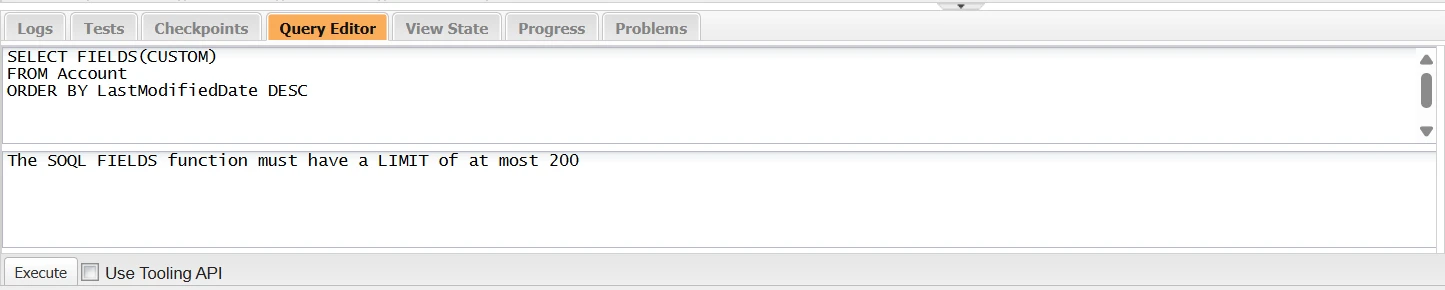
The limit is mandatory. Queries without a LIMIT clause, or queries with a LIMIT greater than 200, throw the following error:
The SOQL FIELDS function must have a LIMIT of at most 200.

If you need larger data extracts, explicitly list the required fields or retrieve records in smaller batches using pagination patterns.
Using FIELDS() with Bulk API 2.0
Bulk API 2.0 supports FIELDS(STANDARD) but not FIELDS(ALL) or FIELDS(CUSTOM). Salesforce allows FIELDS(STANDARD) because the returned fields are fixed and known in advance. The number of custom fields varies between orgs, so FIELDS(ALL) and FIELDS(CUSTOM) are not supported in Bulk API 2.0. Include those fields explicitly in your query if you need them.
Performance impact on objects with many fields
FIELDS(ALL) returns all accessible standard and custom fields on an object, including long text area and formula fields. As the number of fields increases, query results become larger and may require more processing than queries that select only the fields you need.
FIELDS(ALL) works well for ad hoc exploration, testing, and troubleshooting. For production code, explicitly selecting required fields typically produces more maintainable queries and avoids retrieving unnecessary data.
Field-level security still applies
FIELDS() respects field-level security. Users only receive values for fields they have permission to access.
If a field is hidden from the running user, it will not appear in the query results, even when using FIELDS(ALL). This behavior protects sensitive data but can cause confusion when troubleshooting missing fields.
Note: To include archived or soft-deleted records, use ALL ROWS in an Apex SOQL query or the queryAll() operation in the API. Standard queries exclude these records.
Selecting All Fields in Excel and Google Sheets
Admins who need all fields from an object do not always have to write FIELDS() queries manually. Tools like XL-Connector for Excel and Excel Online, and G-Connector for Google Sheets, offer a user interface to select all fields from an object and pull the data directly into a spreadsheet.
This approach is useful for tasks like monthly data audits, where reviewing every field value across thousands of records is necessary. Users can select an object, choose all fields with a few clicks, and retrieve results without manually building field lists. For users who prefer SOQL, both tools support pasting FIELDS() queries within the 200-record limit.
To learn more, see our overview of Salesforce SOQL APIs.
Conclusion
The FIELDS() function makes it easier to query multiple fields without maintaining long field lists. Use FIELDS(ALL) when you need every accessible field, FIELDS(STANDARD) for standard fields, and FIELDS(CUSTOM) for custom fields. Just keep in mind the record limits, API support, Apex restrictions, and performance trade-offs before using it in your queries.
FAQs
Does SOQL have SELECT *?
No. SOQL doesn't support SELECT * like SQL. Use FIELDS(ALL), FIELDS(STANDARD), or FIELDS(CUSTOM) instead — these were introduced in Spring '21.
What is the difference between FIELDS(ALL) and FIELDS(STANDARD)?
FIELDS(ALL) returns all accessible standard and custom fields on an object. FIELDS(STANDARD) returns only standard fields. Queries that use FIELDS(ALL) must include a LIMIT of 200 records or fewer. FIELDS(STANDARD) has no such requirement.
Why does FIELDS(ALL) require LIMIT 200?
The number of custom fields differs across orgs, making the amount of returned data unpredictable. To control resource usage, Salesforce restricts FIELDS(ALL) queries to 200 records. Standard fields are predefined, so FIELDS(STANDARD) does not have this restriction.
Can I use FIELDS() in Bulk API?
Bulk API 2.0 supports FIELDS(STANDARD). It does not support FIELDS(ALL) or FIELDS(CUSTOM). For unsupported variations, specify fields explicitly in the SELECT clause.
How Can I Retrieve More Than 200 Records When Using FIELDS()?
FIELDS(ALL) and FIELDS(CUSTOM) can be used only in unbounded queries with a LIMIT of 200 records or fewer. To retrieve more than 200 records, list the required fields explicitly instead of using FIELDS(). Then paginate through the results using your API's query locator, such as nextRecordsUrl in the REST API, queryMore() in the SOAP API or Sforce-Locator header in job’s result in case of Bulk API 2.0.
Can I Use FIELDS() in Subqueries?
Yes. You can use FIELDS() in parent-to-child subqueries, subject to the same limits.
SELECT Name,
(SELECT FIELDS(ALL) FROM Contacts LIMIT 200)
FROM Account
In this example, the child query returns up to 200 Contact records for each Account. To retrieve more child records, use an explicit field list and another retrieval method.

Rajeshwari Jain
Content Manager
Rajeshwari Jain is a Technical Support Specialist and Content Writer at Xappex. She applies her practical experience to assist customers and create articles on how Xappex tools work with Salesforce to improve data management and increase efficiency.
She began her IT career in 2022 as a Quality Assurance professional before transitioning into Salesforce administration and technical writing in 2023. With Salesforce Certified Administrator and Associate certifications, Rajeshwari writes blogs on Salesforce flows, admin tools, and updates to expand her skills outside of work.
In her free time, she enjoys reading tech blogs and experimenting with new tools.
Feel free to reach out to Rajeshwari for collaborations or to check out her Salesforce-focused content.