Get Started Free



Salesforce gives you several options for moving data, from built-in tools like Data Import Wizard and Data Loader to ETL platforms and API-based methods. There’s no single tool that fits every scenario. Your choice should be based on data structure, object relationships, volume, and the migration method you follow. In practice, outcomes depend more on how the migration is handled than on the tool used.
Why Choosing a Migration Tool Is Harder Than It Looks
When teams look for Salesforce data migration tools, it often feels like the biggest decision in the project. It sounds simple. Pick a tool, move the data, and finish the job.
In reality, that is not how migration works.
A tool does one thing. It moves data. It does not fix messy records. It does not understand how your data is connected. It does not decide how your Salesforce should be structured.
Most issues in migration come from:
- unclear data relationships
- poor data quality
- incorrect mapping between systems
For example, moving a small set of Accounts, Contacts, and Opportunities can be more difficult than moving a large list of simple records. This is because those objects depend on each other.
So the real challenge is not choosing a tool. It is understanding the full process where the tool fits.
Migration Is Not Just Data Import
Migration is more than just uploading data to Salesforce. It is a step-by-step process. Each step matters, and each one affects the final result.
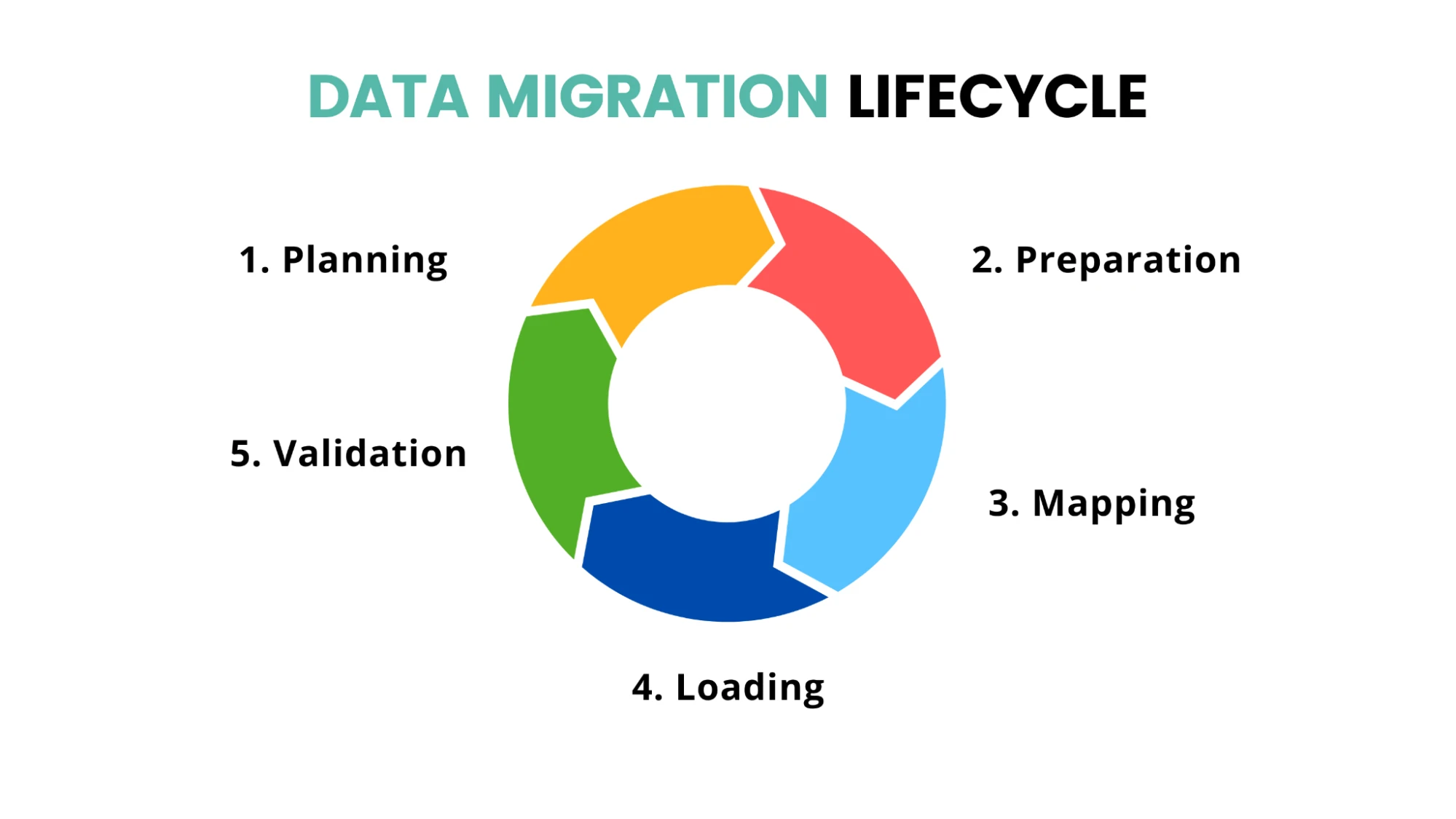
At a basic level, migration includes the following:
-
planning
-
data preparation
-
data mapping
-
data loading
-
validation
Each of these plays a different role.
Planning is the starting point of any migration. This is where you decide which data needs to be moved and how different records are related to each other. If the structure is not planned properly, the data relationships may not work correctly after migration.
Data preparation is about getting your data ready. This means fixing formats, filling missing fields, and making sure the data fits Salesforce.
Data mapping is where you match the data from your old system to the correct Salesforce fields. This step also helps maintain relationships between records, often by using external IDs to keep related data connected.
Data loading is the stage where the actual migration tools come into use. These tools move the data into Salesforce, usually in batches or through APIs.
Validation is where you check if everything worked. You confirm that the records are complete and the relationships are correct.
There are also a few important supporting steps that should not be skipped:
-
Data cleansing to remove duplicates and fix errors
-
Sandbox testing and dry runs to test safely
-
Backup before migration, so you can recover if something goes wrong
-
Reconciliation after migration to make sure nothing is missing or duplicated
These steps reduce risk and save time later.
Most migration issues are not caused by the tool itself. They usually occur due to poor data quality, incorrect field mapping, broken record relationships, or missing validation during the process. The tool simply moves the data the way it has been configured.
That’s why choosing a tool shouldn’t be the first step. The focus should really shift from asking, “Which tool should we use?” to asking, “Are we actually ready for the migration?”
Once the process is clear, choosing the right tool becomes much easier.
What Actually Drives Tool Choice
Tool selection should be based on how your data is structured and how the migration will be executed.
Data Volume
The amount of data you’re migrating plays a big role in deciding which migration tool will work best. Smaller datasets, such as a limited number of Leads or Contacts, can usually be managed with Salesforce’s native tools.
But when you’re dealing with large volumes of Accounts, Contacts, or Opportunities, you may need a tool that supports bulk processing and can handle data more efficiently.
Flat Data vs Related Data
Some Salesforce records can be migrated independently, while others depend on relationships between objects. Flat data, like Leads, is usually easier to migrate because the records stand alone. Related data, such as Accounts, Contacts, and Opportunities, requires proper relationship mapping to ensure the records stay connected correctly after migration.
Parent-Child Relationships
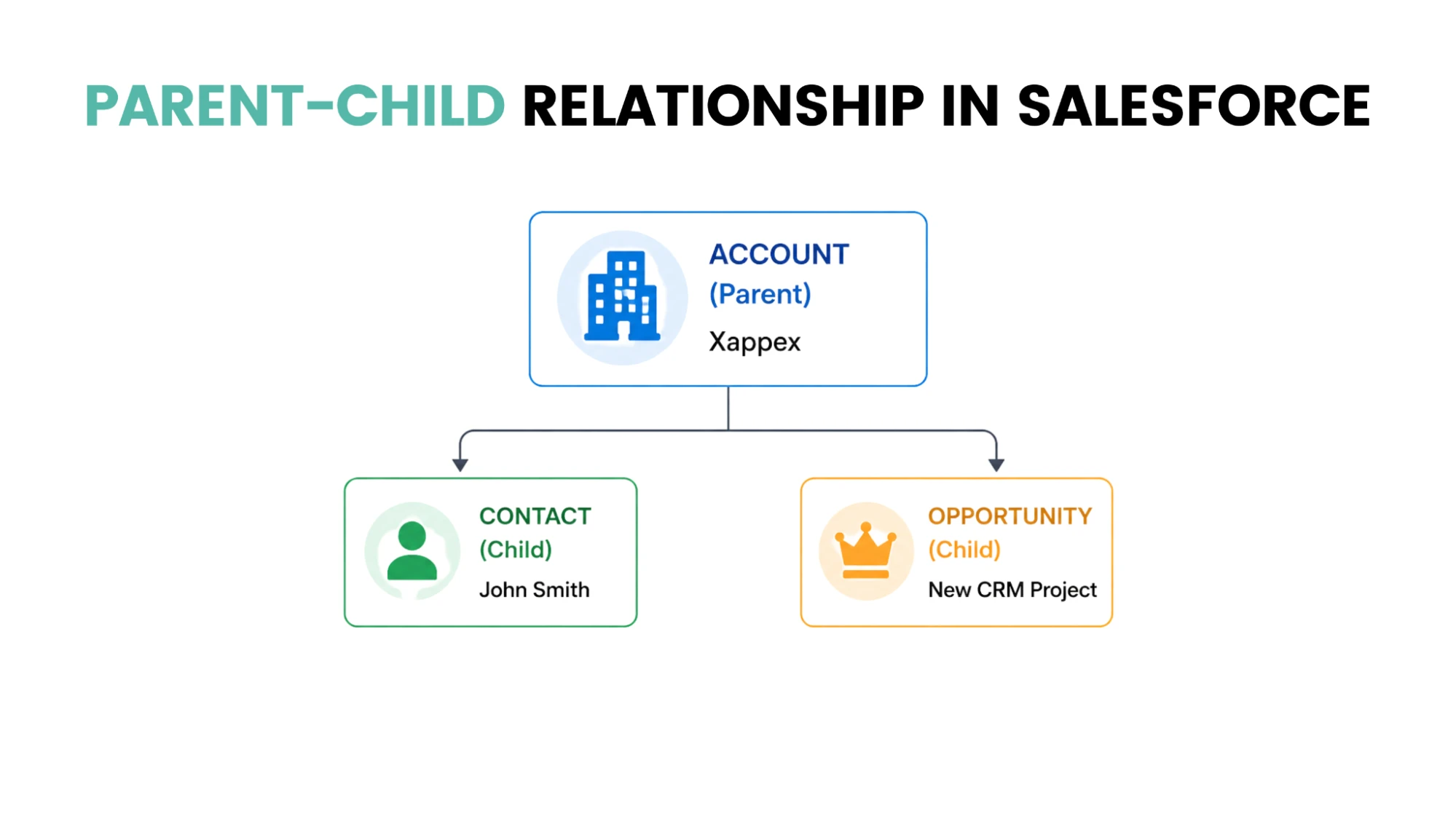
Salesforce is built on a relational data model, where objects are linked through well-defined relationships.
-
Contacts belong to Accounts
-
Opportunities belong to Accounts
These are known as parent-child relationships in Salesforce. If the parent record isn’t created, the child record won’t be able to link to it. This is also one of the most common reasons behind errors like an invalid cross-reference ID in Salesforce.

Note
Plan the data load sequence carefully before starting the migration. Parent records, like Accounts, should be inserted first, followed by related records such as Contacts or Opportunities. Loading data in the wrong order can lead to failed records or missing relationships.
External IDs
External IDs help you connect records during migration. Instead of using Salesforce IDs, you use a unique value from your old system.
For example:
-
Use an external ID on Accounts
-
Link Contacts to Accounts using that ID
If you want to understand how upsert works with external IDs in more detail, you can read this guide on the best upsert and bulk APIs in Salesforce.
Note
Add the external ID field in Salesforce before starting the export from the old system. Store the legacy record ID in that field and mark it as Unique + External ID. This makes rerunning failed loads easier with upsert and also helps maintain parent-child relationships during migration.
Data Quality
Data quality is one of the biggest factors in any migration. Common issues include duplicate contacts or leads, missing fields, and incorrect data formats. No data migration tool in Salesforce can fully fix bad data.
One-Time vs Phased Migration
A one-time migration involves moving all your data at once, making it simpler to set up and execute. In contrast, a phased migration moves data in stages, offering more control over the process but also adding complexity.
For example:
-
Moving all Accounts and Contacts in one go is easier
-
Moving them in stages while teams are working adds risk.
Data Transformation Needs
Sometimes data cannot be moved as it is, and you may need to change formats, combine fields, or split data into new fields. This process is known as data transformation, and not all tools handle it effectively.
Files and attachments are often one of the most underestimated parts of Salesforce migration. Salesforce stores files using ContentVersion and ContentDocumentLink records instead of directly on the parent object. Because of this structure, native tools like Data Loader can become difficult to manage for file-heavy migrations, while tools like SFDMU or ETL platforms usually handle these relationships more effectively.
You can learn more about how Salesforce Files, ContentDocument, and ContentVersion work.
Tools like XL-Connector, SFDX Data Move Utility (SFDMU), and ETL platforms can help handle data transformations, relationship mapping, and file migrations more effectively than basic import tools. Some also provide built-in error tracking and validation capabilities, which can make large migrations easier to manage.
Main Types of Salesforce Data Migration Tools
The tool you pick depends on your data and how you plan to move it. Let’s look at the main types of Salesforce data migration tools. Not as a list to compare, but to understand where each one actually fits.
Native Salesforce Tools
Salesforce already gives you built-in options like Data Import Wizard and Data Loader.
It is important to note that the Data Import Wizard supports only a limited number of standard objects. It works well for records like Accounts, Contacts, Leads, Campaign Members, Person Accounts, and custom objects, while objects such as Opportunities, Cases, Assets, Contracts, and Products are not supported.
Suppose you have a clean list of leads, or you just need to update a few fields in contacts. You can get that done quickly without much setup.
The complexity arises when your data is interconnected. Objects like Accounts, Contacts, and Opportunities depend on each other. Native tools do not give you much control over how these relationships are handled.
They also do not do much in terms of validation.
ETL and Integration Tools
Once the data gets more complex, teams usually look beyond native Salesforce tools. Depending on the migration requirements, they may use ETL platforms such as Jitterbit, Informatica, or Talend, or Salesforce-focused migration tools like XL-Connector and SFDX Data Move Utility (SFDMU).
For example, if you are migrating Accounts, Contacts, and Opportunities together, you cannot just upload files and hope for the best. Everything needs to stay linked. Sometimes the data also needs to be reshaped before it fits into Salesforce.
They give you more control over how data moves, how it is mapped, and how relationships are maintained. They also handle large datasets better and can run jobs on a schedule if needed.
These tools take effort to set up. You need to configure them properly. And small mistakes can cause big issues, especially when you are dealing with a lot of data.
For handling large datasets, tools like the Salesforce Data Loader are also commonly used.
Data Loader uses the SOAP API by default, but you can enable Bulk API for high-volume migrations. The Bulk API is generally a better choice for large datasets since it is built to handle records in batches more efficiently.
Some teams even go further and use scripts or custom setups when they need very specific control.
Sync and Phased Migration Tools
If you are doing a one-time migration, you move everything, switch systems, and you are done. Simple.
But if you are doing a phased migration, things stretch out. Data moves in parts. Teams may switch at different times. Sometimes, both systems need to stay active for a while.
In that case, you need tools that support data sync or even real-time sync. These tools help keep both systems updated while the migration is still happening.
Without proper sync, data can quickly fall out of alignment. So your approach, not just your data, affects the kind of tool you need. Platforms like MuleSoft, Workato, Skyvia, and Heroku Connect are often used for this type of setup, especially when data needs to remain synchronised between systems during a phased migration.
Spreadsheet-Based Approaches
Tools like XL-Connector provide a spreadsheet-based approach to Salesforce migration while still supporting the actual migration process.
With XL-Connector, you can export data from Salesforce, SQL Server, or other sources, prepare and transform that data in Excel, and then load it back into Salesforce from the same workbook.
It can be used for:
-
Data migrations and bulk updates
-
Maintaining parent-child relationships
-
Data preparation and transformation
-
Error handling and troubleshooting
-
File and attachment migrations
-
Metadata-related tasks such as custom field, object, and permission updates
-
Post-migration validation and reconciliation
For teams that already work heavily in Excel, this can simplify the migration process by keeping data preparation, migration, and validation in a single workspace.
How to Choose the Right Salesforce Data Migration Tool
At this point, the question is simple. Which approach should you use for your situation?
Instead of comparing features, it helps to look at real scenarios. Your data volume, data relationships, and data quality will guide the decision.
| Situation | What works best | Why it works | Limits to watch | Common mistake |
|---|---|---|---|---|
| Small, one-time data migration | Native tools like the Data Import Wizard or the Data Loader | Fast setup, easy to use, good for simple data like leads or basic contacts | Limited data validation and less control over data | Using this for messy data or linked records |
| Large data volume | Data Loader or ETL tools | Handles batch processing, works well for bulk migration of Accounts and Contacts | Needs setup, monitoring, and attention to API limits | Ignoring data mapping and assuming the tool will handle everything |
| Complex data relationships | ETL tools or controlled logic | Maintains parent-child relationships like Accounts, Contacts, and Opportunities | More setup, higher complexity | Breaking links between records due to the wrong load order |
| Phased migration or ongoing data sync | Integration or sync-based tools | Keeps systems aligned with scheduled or real-time sync | More moving parts require ongoing monitoring and validation | Using one-time tools for ongoing needs |
| Data cleansing and data validation | Spreadsheet-based tools like XL-Connector | Supports data migration, relationship management, metadata updates and error tracking | May not be the preferred choice for every enterprise integration scenario | Assuming spreadsheet-based tools are only useful for data preparation |
How to Use This
Most migrations are not just one case.
For example:
- You might use an ETL tool for highly automated migrations involving multiple systems and complex integrations.
- Alternatively, many Salesforce teams use tools like XL-Connector to manage data preparation, migration, relationship handling, file migration, and validation from a single Excel-based workspace.
The best approach depends on your migration requirements, team skills, and preferred workflow.
Common Mistakes to Avoid
Starting With the Tool Instead of the Data
Many people start by picking a tool and jumping into data loading. If your data quality is not good, the tool will just move bad data into Salesforce.
What you might notice:
-
duplicate leads or contacts
-
missing or messy fields
-
inconsistent data
This usually leads to duplicate records, reporting issues, and additional cleanup effort after the migration is complete.
Not Paying Enough Attention to Relationships
When you are dealing with Salesforce objects like Accounts, Contacts, and Opportunities, everything is connected. If those links break, the data loses meaning.
For example, Contacts may fail to connect with the correct Accounts, or Opportunities may lose their business context if relationships are not migrated properly.
Skipping Sandbox Testing
It is tempting to skip testing and go straight to the final migration.
If you skip it:
-
You only find problems after the data is live
-
Errors affect a large number of records.
Without proper testing, migration issues often appear directly in production, leading to delays, rework, and unnecessary pressure during deployment.
Note
While testing a migration, include records with relationships, mandatory fields, picklist values, and edge-case scenarios. Simple sample data may work without issues, but actual migration problems usually appear in complex or dependent records.
Expecting the Tool to Do Everything
Tools are helpful, but they are not magic.
What tools will not do:
- Fix your data mapping
- Clean your data
- Handle every edge case automatically
This can result in incorrect field mapping, broken record relationships, and additional manual corrections after the migration.
Skipping Validation After Migration
Once the data is loaded, it is easy to move on. But this is where a lot of issues get missed.
What you should check:
-
Sample records
-
Total record counts
-
Key fields
If validation is skipped, missing or incorrect data often gets discovered later by business users, which increases post-migration cleanup effort.
Why This Matters
Most of these mistakes lead to common outcomes:
- Broken relationships
- Duplicate records
- Poor data quality
- Manual cleanup after migration
Salesforce data migration tools help you move data, but the real success comes from how well you prepare, test, and check your work.
Conclusion
Salesforce data migration tools are not a one-size-fits-all solution.
The right choice depends on your data, how it’s connected, and how you plan to move it. The decision depends more on data relationships, transformation needs, and migration complexity than on tool features alone.
Equally important, what you do before and after migration makes a big difference.
Good data cleansing, clear data mapping, and proper data validation help ensure data integrity and reduce the need for manual fixes later on.
Tools, in short, help you move data. But it’s the preparation, testing, and validation that make the migration work.
FAQ
What is the best tool for migrating data to Salesforce?
Salesforce tools like Data Import Wizard & Data Loader are usually enough for smaller migrations involving Leads, Contacts, or simple updates. ETL tools become more useful when the migration includes transformations, large record volumes, or complex relationships
How long does it take to migrate data in Salesforce?
Salesforce migration timelines usually depend on factors like data quality, object relationships, validation efforts, and file migration requirements. Smaller and cleaner migrations can be completed relatively quickly, whereas larger migrations involving multiple related objects often require several testing and validation cycles before going live.
What is sandbox testing in Salesforce migration?
Sandbox testing means validating the migration in a test environment before moving data into production. Teams usually migrate a smaller data set to a sandbox to identify issues with mappings, relationships, or validations and fix them before the final deployment.
What is the greatest risk in Salesforce data migration?
One major risk during Salesforce migration is bringing bad or incomplete data into the new system. Problems like duplicate records, missing details, or broken relationships can create issues later.
Can I use spreadsheets to migrate my Salesforce data?
Yes. With XL-Connector, you can manage Salesforce migrations without leaving Excel. It can be used to move and update data, maintain record relationships, migrate files and attachments, review errors, and validate the results once the migration is complete.
Do I need ETL tools for my Salesforce migration?
If your data is small and simple, Salesforce’s own tools usually work fine. But when the data is large, connected, or needs some changes before uploading, that’s where ETL tools start to make more sense.

Harshit Sharma
Salesforce Consultant
Salesforce Consultant with 5+ years of experience partnering with businesses to design, implement, and optimise Salesforce solutions. Skilled in solution consulting, stakeholder management, business process transformation, and delivering scalable solutions across the Salesforce ecosystem.