Get Started Free

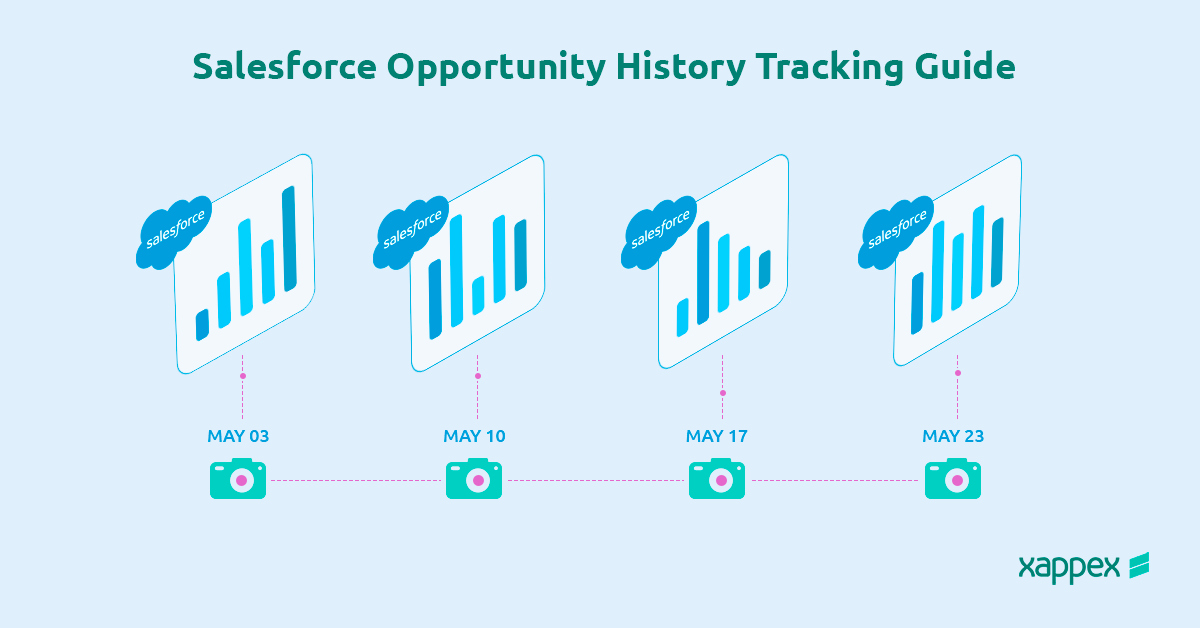
Learn how to easily track Salesforce opportunity product history and update history with field tracking setup for better data management.
Salesforce: Track Update History for Opportunities
Field History tracking in Salesforce is a powerful feature that allows users to monitor changes in data over time. For opportunities, this tracking can include updates to fields such as stage, amount, close date. When history tracking is enabled, Salesforce automatically records changes to selected fields, creating a timeline of updates that can be reviewed later. However, Opportunity Product (OpportunityLineItem) History Tracking is not possible in Salesforce nor is it an option in standard Salesforce tools.
Importance of History Tracking for Auditing and Data Management:
- Audit Trail
Field history tracking creates a reliable audit trail, showing who made changes, when they were made, and the previous values. This is crucial for accountability and compliance, especially in industries where traceability is a regulatory requirement. - Improved Data Accuracy
By capturing a log of changes, history tracking helps in identifying data entry errors, trends, or unusual activities that may impact business decisions. This level of oversight can improve overall data integrity and reduce the risk of inaccurate reporting.
What Is Salesforce Opportunity Product History Tracking?
Salesforce Opportunity Product History Tracking would allow businesses to monitor and record changes to products associated with each opportunity. In Salesforce, opportunities represent sales deals, and these opportunities often involve various products with details such as quantity, price, and discounts. With Opportunity Product History Tracking, users would be able to keep track of every modification to these product details, creating a comprehensive record of the products linked to each deal over time.
How to Set Opportunity Product History Tracking in Salesforce
As mentioned before, Salesforce interface does not allow Opportunity Product History Tracking. Users are able to track history of Opportunity fields by enabling History Tracking from the Fields and Relationships section of the Opportunity object:
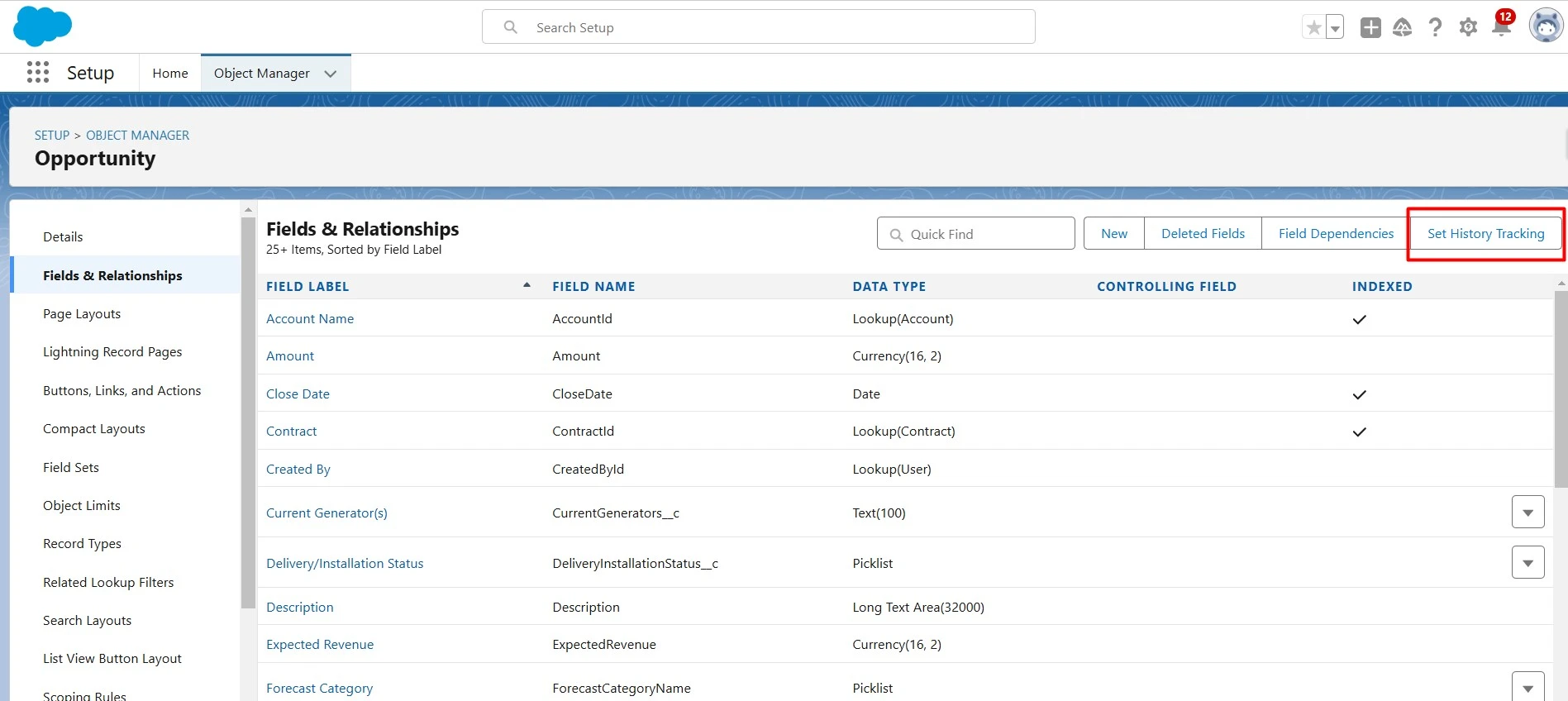
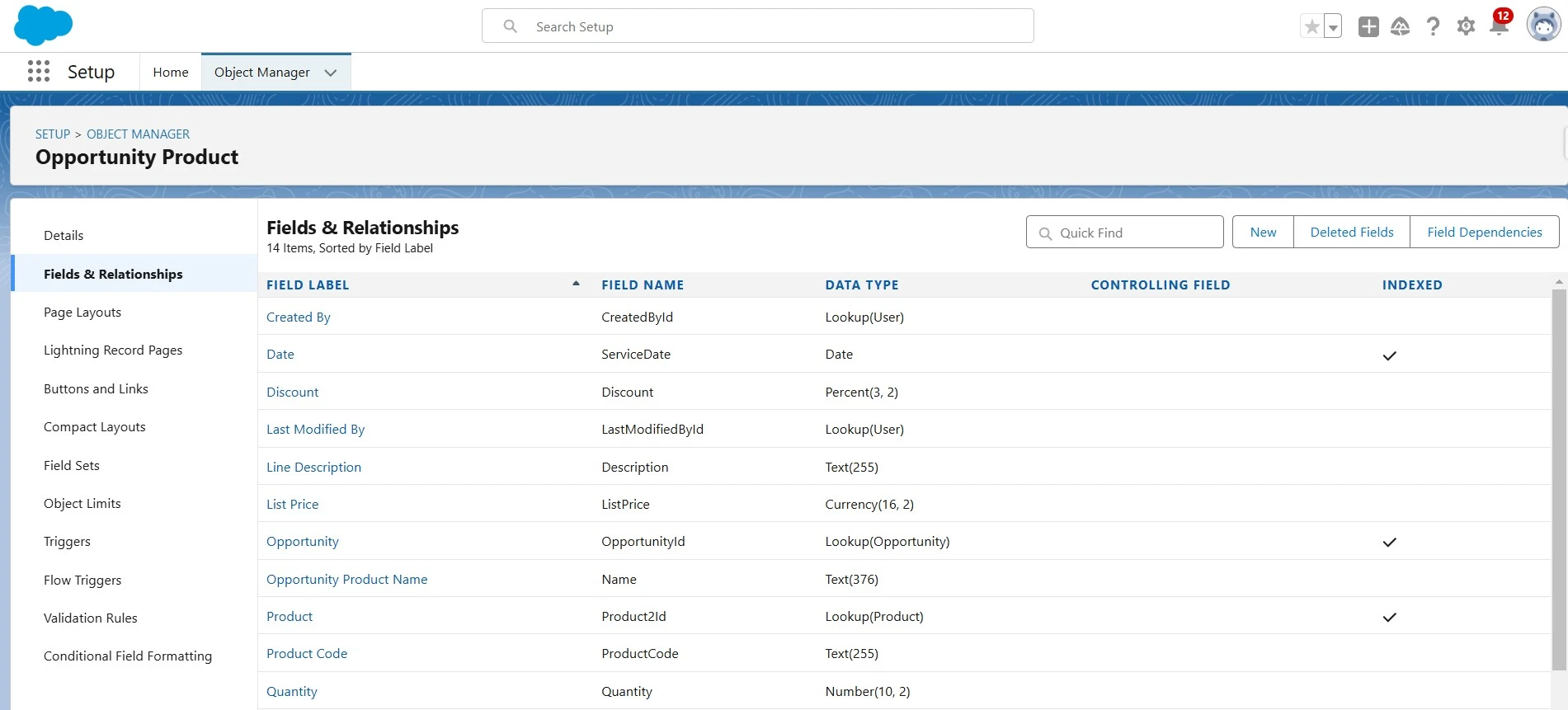
However, in the case of the Opportunity Product object, this option is not available:
The Xappex Solution
Xappex offers an incredible alternative to history tracking, which allows tracking Opportunity Products as well. G-Connector’s snapshot functionality lets users track changes of any field in the Opportunity Product object by pulling the data to a Google spreadsheet and creating a snapshot of the data to a selected Google Drive folder. This way, they are able to access historical data and see any of the data points they can pull from Salesforce as they were at a given moment in time. This feature of G-connector is available for any standard object as well as custom objects.
How to Create a Snapshot for Opportunity Product History Tracking
-
1
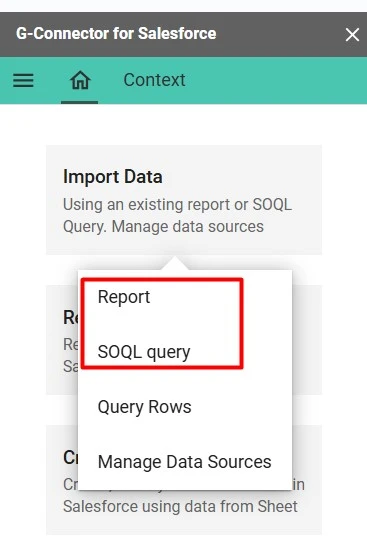
Pull all the fields you would like to track from the OpportunityProduct to a Google spreadsheet using G-Connector. This could be done through an SOQL query or by pulling a report you first create in Salesforce.

-
2
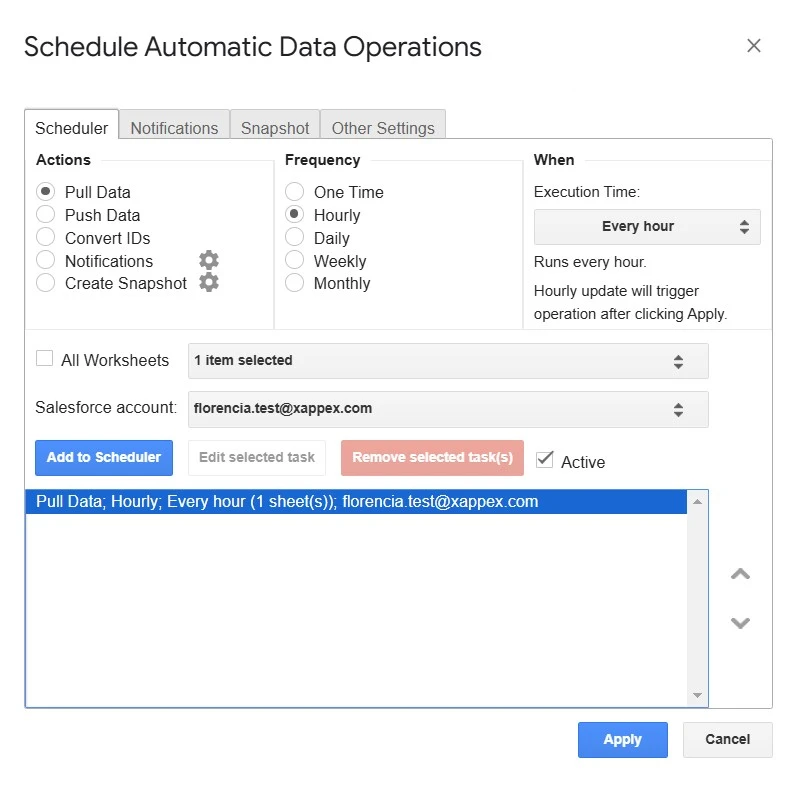
Create an automated operation to refresh that data at your desired frequency, so that data is retained if any changes are made in Salesforce.
-
3
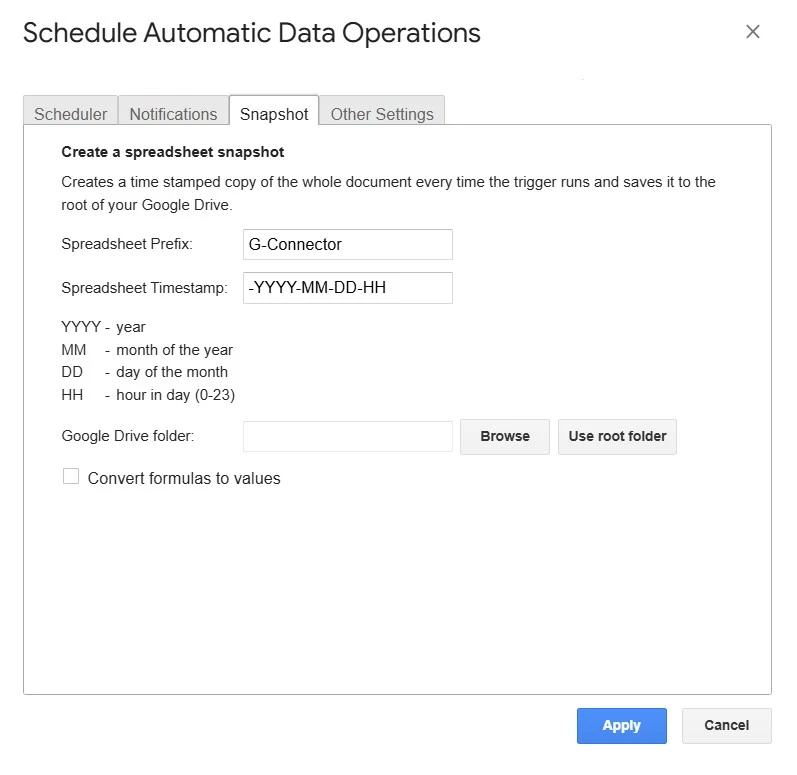
Schedule the creation of a snapshot of your data, right after the refresh. You will need to define the folder you want your snapshot to be saved to.
-
4
Click Apply to save your scheduled actions.
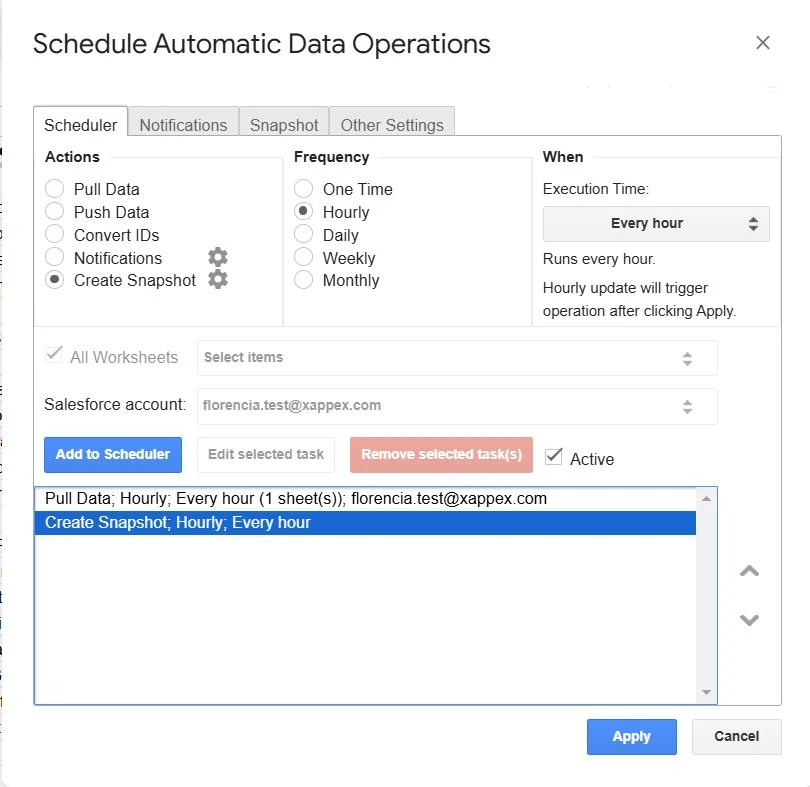
Following these steps, you will be able to get reports of your Opportunity Product’s field changes.
Why Use Opportunity Product History Reports?
Opportunity Product History Reports provide valuable insights by tracking changes to product details, such as pricing, quantities, and discounts, throughout the sales cycle. They enhance sales insights by identifying patterns that influence deal success and support accurate revenue forecasting by showcasing product trends. These reports ensure accountability with an audit trail of changes, improve team collaboration through shared visibility, and drive strategic decision-making by refining pricing strategies and product offerings. Overall, they empower businesses to optimize sales processes, maintain transparency, and make data-driven decisions for better outcomes.
Conclusion
Opportunity Product History Tracking offers immense value by providing detailed understanding of product changes, enhancing accountability, improving team collaboration, and supporting data-driven decision-making. By capturing and analyzing historical product data, businesses can optimize their sales processes, refine pricing strategies, and strengthen customer relationships.
To be able to obtain these benefits, consider exploring a tool like G-Connector by Xappex which seamlessly integrates Salesforce data into Google Sheets. This tool can help streamline reporting and provide deeper insights into Opportunity Product history, empowering your team to make smarter decisions and drive success.
Start a 14-day free trial of G-Connector and see an immediate boost in your data management!



Florencia Mouriz
Florencia Mouriz is a professional with over two years of experience at Xappex, where she has performed as a Technical Support Agent and Coordinator, and Technical Writer. In this role, Florencia provides support to customers while creating educational content and tutorials that guide users through the implementation of Xappex tools with Salesforce. Her contributions seek to enhance customer understanding and optimize the use of these tools.
Before joining Xappex, Florencia gained valuable experience participating in diverse projects for other companies, where she worked as a Salesforce Administrator and implemented Vlocity solutions. She has an extensive background in Salesforce ecosystems and is determined to deliver impactful results for our company.
Based in Tandil, Bs As, Argentina
To learn more about Florencia’s experience and connect with her, visit her LinkedIn profile